



With NVIDIA's RTX Spark N1X inside, the Surface Laptop Ultra ran everything from a 27B dense model to a 120B multimodal model locally, and stayed remarkably usable in the process.
There's something wonderfully ridiculous about loading a 120-billion-parameter AI model onto a laptop, watching it generate text at 33 tokens per second, and realizing the entire operation is happening on the computer sitting in front of you…on a battery.
No cloud inference. No rented GPUs. No API fees ticking away with every token.
That's what I've spent the past several days doing with Microsoft's new Surface Laptop Ultra, a premium Windows machine built around NVIDIA's RTX Spark N1X processor.
And after running traditional benchmarks, testing three very different local AI models, measuring battery performance, and using the machine for my everyday work, I'm impressed.
Really impressed.
I've used plenty of powerful computers over the years, but the Surface Laptop Ultra is easily the most exciting laptop I've owned. Its local AI capabilities are the biggest reason, although there's considerably more to like here.
It also raises an interesting question about where personal computing is headed. As increasingly capable AI models become practical to run locally, the amount of intelligence your computer can handle may become just as important as traditional processor and graphics performance.
The Surface Laptop Ultra offers a pretty compelling glimpse of that future.
- NVIDIA RTX Spark is the real star here
- It's also a gorgeous laptop
- Traditional benchmarks: A solid foundation
- Three AI models walk into a laptop
- Nemotron 74B: The speed champion
- Qwen 27B: Smaller doesn't necessarily mean faster
- Nemotron 120B: The big one
- What happens when you unplug it?
- The everyday experience may be the biggest surprise
- Windows on ARM has come a long way
- What about the price?
- My verdict: A tremendous laptop for local AI enthusiasts
- How I tested
- Related reading
NVIDIA RTX Spark is the real star here
Microsoft deserves credit for building a beautiful, top-of-the-line computer, but the technology that makes this machine especially interesting comes from NVIDIA.
The Surface Laptop Ultra runs on the RTX Spark N1X, which combines an ARM-based CPU with NVIDIA Blackwell RTX graphics and a unified-memory architecture.
My review unit has the higher-end version of the chip, featuring 20 CPU cores and a 6,144-core GPU, alongside 128 GB of unified memory and a 1 TB SSD. Thankfully, they made it easy to swap in a larger SSD if you choose.
Traditional computers generally have separate pools of system RAM and graphics memory. If you've ever tried running a particularly large language model on a conventional gaming laptop, you've probably discovered how quickly a graphics card's memory limit becomes a problem.
Unified memory changes the equation by allowing the CPU and GPU to work with a shared pool of physical memory.
That doesn't make memory requirements disappear, and it certainly doesn't guarantee that any model will run well. But it creates opportunities that are difficult to reproduce on laptops with relatively small amounts of dedicated GPU memory.
NVIDIA's RTX Spark platform also brings CUDA and the company's AI software ecosystem to Windows on ARM.
That combination is what makes this machine so interesting to me. I spend an enormous amount of time experimenting with AI models, particularly local models, and I've been looking forward to seeing what NVIDIA could accomplish with this architecture.
The answer, so far, is quite a lot.
It's also a gorgeous laptop
Before getting into the benchmarks, I want to spend a little time on the computer itself.
Because Microsoft absolutely nailed the physical design.
The Surface Laptop Ultra is beautifully built. Everything feels premium, from the packaging and hinges to the keyboard, display, buttons, and connectors. The construction is clean, the lines are sharp, and nothing feels cheap.
It's an exceptionally nice piece of hardware.
The 15-inch PixelSense Ultra touchscreen has a resolution of 3270 × 2180, a 3:2 aspect ratio, and a refresh rate of up to 120 Hz. Microsoft also advertises substantial HDR brightness and wide color coverage.
I haven't conducted instrumented display testing, so I won't pretend to have independently verified those specifications. But I can tell you that the display is excellent in everyday use.
It's exceptionally crisp, bright, and pleasant to work with. Whether I'm browsing, writing, working with applications, or watching video, I've found nothing to complain about.
The keyboard is equally good. Everything is where I expect it to be, the keys feel comfortable, and I rarely find myself making typing mistakes because of the layout.
The trackpad is another story.
Microsoft has equipped this thing with an absolutely enormous haptic trackpad. It's big enough that I briefly wondered whether I could use it as a second desk. As trackpads go, I’m sure it’s great.
Unfortunately, no amount of trackpad engineering is going to pry a mouse out of my cold, dead hands.
I'm simply not a trackpad person. I never have been. I've been using my Surface mouse with the laptop, and that's been great. So take my limited trackpad impressions for what they're worth.
The touchscreen, surprisingly, is winning me over.
I've never been especially enthusiastic about touching laptop screens, but for whatever reason, I keep finding myself using this one. I'm trying to make it part of my normal workflow.
Another thoughtful addition is Microsoft's Magnetic Connect USB-C charging cable. It snaps magnetically into place while retaining the advantages of USB-C. It's convenient, satisfying to use, and one of those small touches that makes the whole machine feel thoughtfully designed.
And the fans?
Almost unbelievably quiet.
Even when I've been pushing the hardware with demanding workloads, fan noise has been virtually nonexistent as a practical annoyance. I can tell the cooling system is working, but it hasn't become the soundtrack to my workday.
That matters more than you might think when you're running large AI models for extended periods.
Traditional benchmarks: A solid foundation
I started with a few conventional benchmarks to get a better understanding of the Surface Laptop Ultra's general computing performance.
These aren't the main attraction for this review, but they provide useful context.
In Geekbench 7, the RTX Spark N1X achieved a median single-core score of 1,793 and a median multi-core score of 20,454 across three runs.
I also ran Cinebench 2026 three times in each CPU testing mode.
The multi-thread results were remarkably consistent: 5,796, 5,795, and 5,825 points, producing a median of 5,796.
Single-thread results were 376, 377, and 355, with a median of 376. That final run was noticeably lower than the first two, although the results don't establish why.
The Cinebench multi-thread tests each ran for approximately 10 minutes, giving the machine a sustained CPU workload rather than a quick performance burst.
I didn't observe a meaningful decline across those three runs.
Storage performance was respectable, too. CrystalDiskMark 9.0.3 measured sequential read speeds of approximately 3,643 MB/s and sequential write speeds of 3,435 MB/s using its queued sequential test.
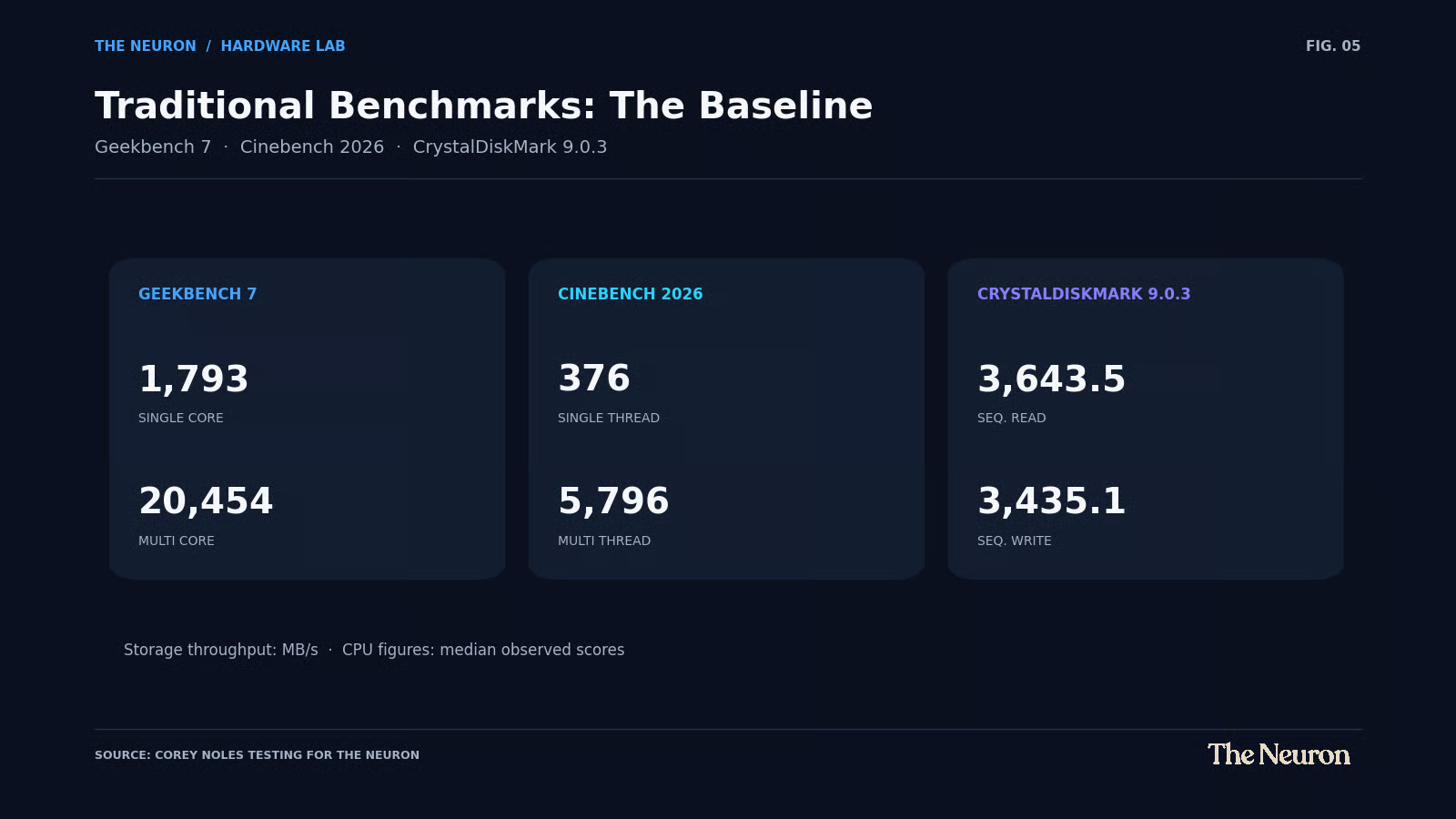
[FIGURE 1: Traditional benchmark scorecard]
All of these benchmarks were performed plugged in with Windows set to Balanced mode. I generally kept other applications closed, apart from a Chrome tab used to record results.
One important qualification: Geekbench 7 and Cinebench 2026 use their own scoring systems. Their results shouldn't be compared directly with older versions of those benchmarks.
And while these numbers help establish a baseline, I wouldn't draw sweeping conclusions about the N1X's position against competing processors without more controlled head-to-head testing.
For this review, the more interesting question was what happened when I started loading local AI models.
Three AI models walk into a laptop
I wanted to test the Surface Laptop Ultra with models that would reveal different aspects of its capabilities.
So I selected three configurations:
• NVIDIA Nemotron 3.5 Bolt 74B-A9B, a mixture-of-experts model running at IQ2_XXS quantization.
• Qwen3.5 27B, a dense model running at Q6_K_XL quantization.
• NVIDIA Nemotron 3.5 Super VL 120B-A12B, a multimodal mixture-of-experts model running at Q3_K_XL quantization.
I ran all three through Unsloth Desktop, using the same general explanatory writing prompt across three generation runs per model.
This wasn't intended as a test of which model was smartest. I've explored model quality in separate experiments, including reasoning, writing, instruction following, and coding.
Here I wanted to measure how the computer handled the workloads.
That meant recording model loading times, generation speeds, response times, and memory usage.
I also wanted to see whether the laptop remained usable while performing these demanding tasks.
The results were fascinating.
Nemotron 74B: The speed champion
Let's start with the 74B model.
Nemotron 3.5 Bolt has approximately 74 billion total parameters, but its mixture-of-experts architecture activates only about 9 billion for each token.
That distinction matters enormously.
Rather than using the entire model for every token, a mixture-of-experts system routes computation through a smaller subset of its available parameters.
Think of a large organization with specialists in many departments. You don't need to invite every employee to every meeting. You bring in the people whose expertise is relevant.
In my tests, Nemotron 74B achieved generation speeds of 61.9, 53.5, and 58.3 tokens per second.
The median was 58.3 tokens per second.
For a local model of this size, running entirely on a laptop, that's an impressive result.
Its median observed loading time was 24.89 seconds across three different loading scenarios, although those scenarios included normal reloading and application restarts rather than identical cold starts.
I also monitored GPU memory usage while running the model. Windows reported approximately 35 GB of total GPU memory allocated.
It's worth emphasizing that this particular model was running at aggressive 2-bit quantization, which reduces memory requirements at the potential cost of some model quality.
That's one of the important trade-offs in local AI: you can often fit a substantially larger model into memory by reducing the precision of its weights.
Qwen 27B: Smaller doesn't necessarily mean faster
Next up was Qwen3.5 27B.
Unlike the Nemotron models, this is a dense model. It uses substantially more of its parameter set for each generated token, and I ran it at considerably higher precision with Q6_K_XL quantization.
I was curious how those differences would play out.
The answer was dramatic.
Across three runs, Qwen generated at 18.3, 16.8, and 16.3 tokens per second.
Its median was 16.8 tokens per second.
That means the 74B Nemotron produced tokens approximately 3.5 times faster than Qwen in these particular configurations, despite having nearly three times as many total parameters.
Qwen also used more reported GPU memory, with Windows showing approximately 47 GB allocated during inference.
Why?
Part of the answer is the difference in quantization. Qwen was running at substantially higher precision, requiring more memory for its model weights.
Its Unsloth memory estimate also included more than 16 GiB for an f16 KV cache configured around a large context window and multiple parallel slots.
And then there's the architectural difference between dense and mixture-of-experts models.
The result provides a useful illustration of why raw parameter counts aren't enough to predict local inference performance.
Nemotron 120B: The big one
Finally, I loaded Nemotron 3.5 Super VL 120B-A12B.
This was the test I was most excited about.
We're talking about a multimodal model with approximately 120 billion total parameters and roughly 12 billion active parameters per token.
I used a Q3_K_XL quantization, which helped make the model practical to run within the available memory. Loading took about a minute.
Across three tests, the model loaded in 63.00, 59.24, and 61.01 seconds.
Then I ran the same general text-generation benchmark.
The resulting speeds were 32.6, 34.3, and 33.0 tokens per second.
That's a median of 33 tokens per second from a 120B model running locally on a laptop.
Windows reported approximately 66 GB of GPU memory allocated, including 62.1 GB in its dedicated GPU-memory category and another 3.7 GB in shared GPU memory.
Because this is a unified-memory architecture, those categories require careful interpretation. They don't represent independent physical pools of memory that can simply be added to the system's installed RAM.
Still, the practical achievement is impressive.
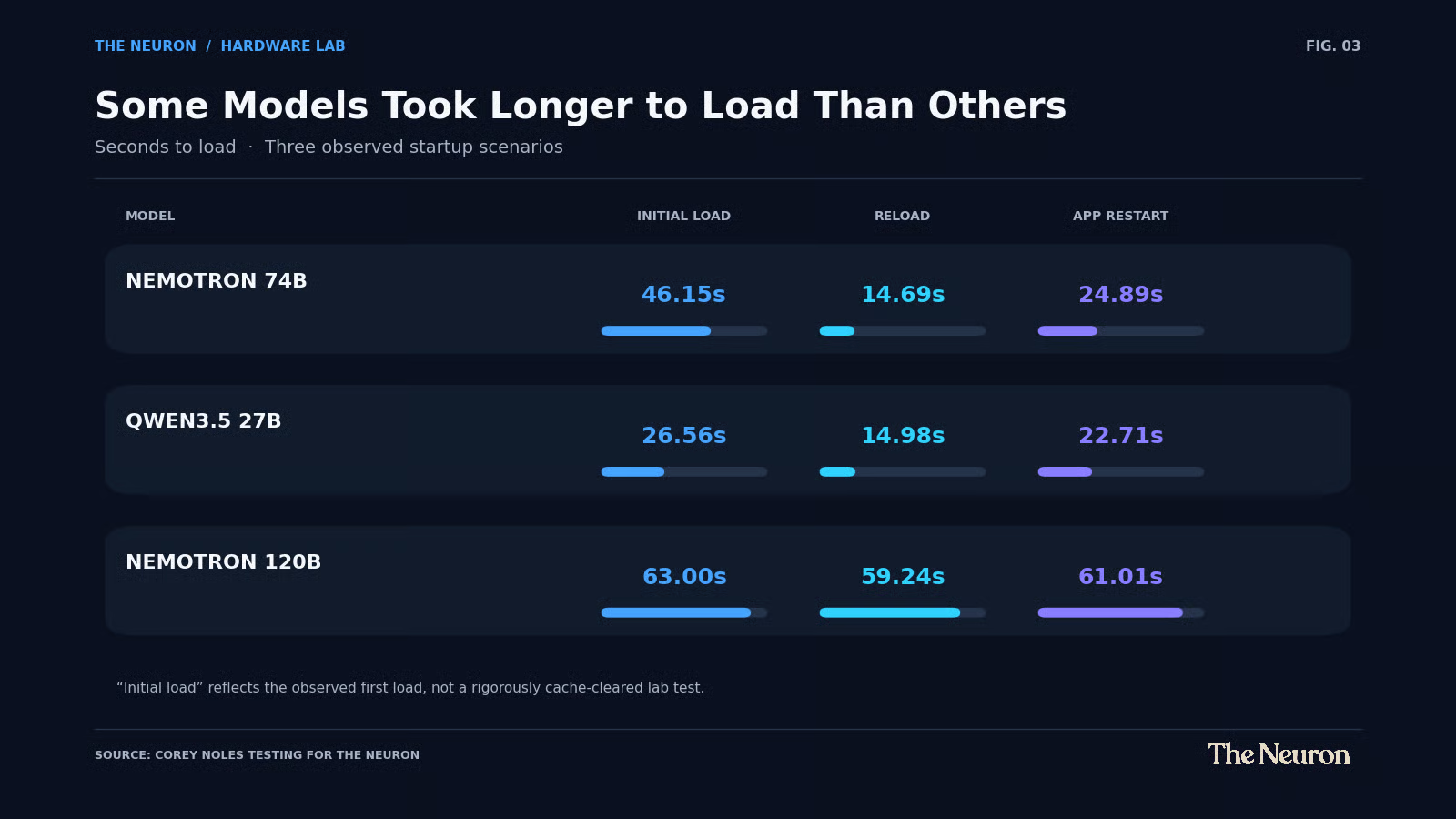
Across the three configurations, the fastest generation speed came from the 74B Nemotron, followed by the 120B Nemotron and then Qwen 27B.
These weren't perfectly matched model comparisons. They involved different architectures, quantizations, cache configurations, and inference optimizations. Unsloth's reported token counts also included reasoning tokens.
But they tell us something useful about the Surface Laptop Ultra: it can comfortably accommodate several classes of substantial local language models, including models that would be difficult to run on many conventional laptops.
And I haven't even begun to exhaust the possibilities.
What happens when you unplug it?
For me, this was one of the most interesting questions of the entire review.
It's one thing to run a massive language model while your computer is plugged into the wall.
It's another to run one wherever you happen to be.
I chose Nemotron 74B for the battery test because it offered an attractive balance of model size and inference speed.
I disconnected the Surface Laptop Ultra from power, kept Windows in Balanced mode, and repeated the generation workload three times.
The results were better than I expected.
The three unplugged runs produced 50.1, 48.7, and 54.3 tokens per second.
That works out to a median of 50.1 tokens per second, compared with 58.3 tokens per second plugged in.
In other words, unplugging reduced median generation throughput by approximately 14%.
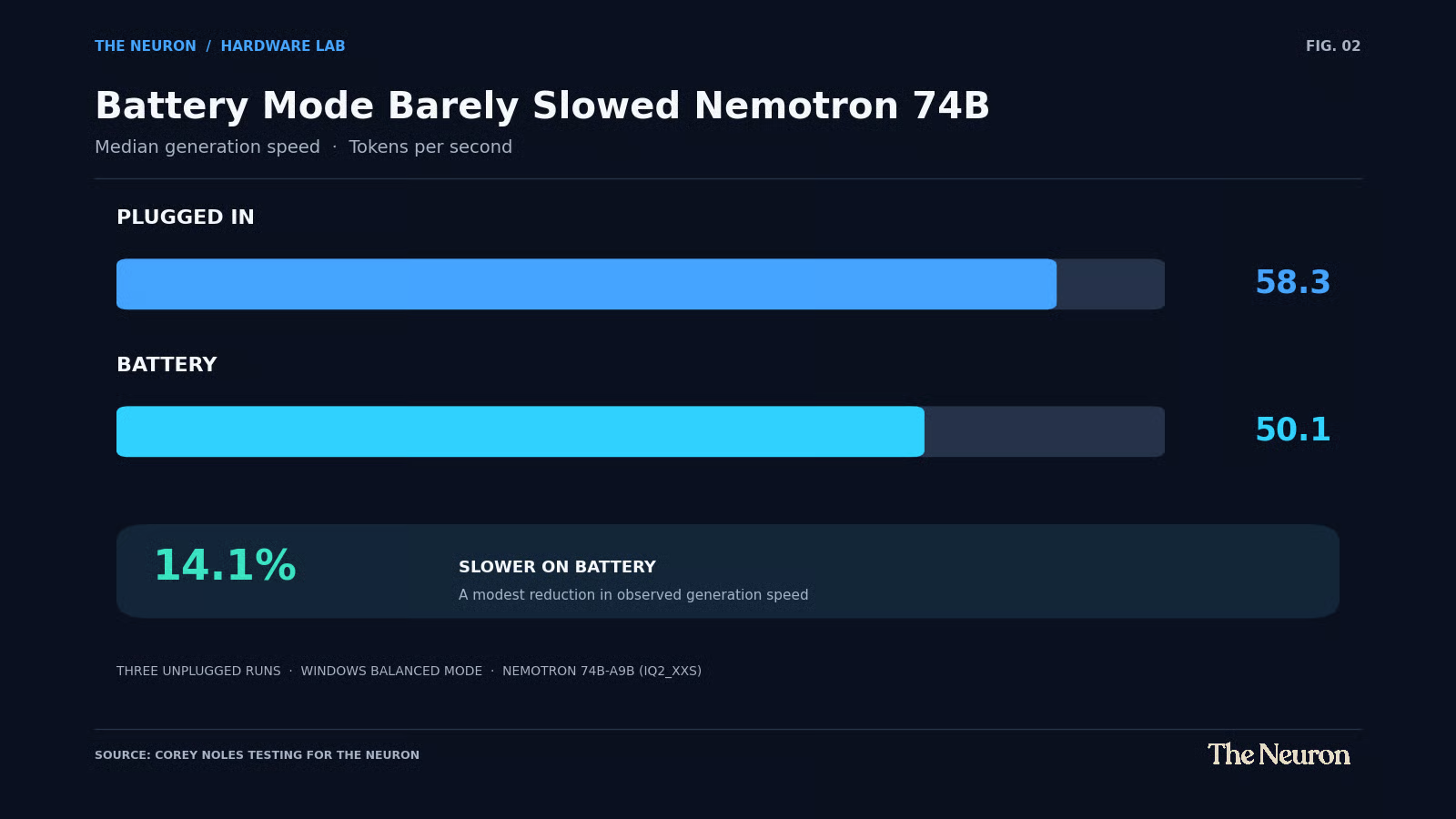
[FIGURE 4: Plugged-in versus battery generation speed]
That's a trade-off I'd happily make for the ability to run a large local model almost anywhere.
The third battery run was particularly interesting.
Nemotron generated 25,273 tokens over approximately seven minutes and 47 seconds, maintaining an average generation speed of 54.3 tokens per second.
During that run, battery charge fell from 91% to 81%.
Across the broader battery testing session, including loading and other activity, the charge dropped from 97% to 81%.
These observations aren't sufficient to calculate a reliable full-charge AI inference runtime. Battery percentages are coarse measurements, and the session included more than one type of activity.
But the results demonstrate that serious local AI inference is possible on battery without a dramatic collapse in generation speed.
And here's the part that may have impressed me most.
Throughout all three battery runs, including that lengthy final generation, the computer remained responsive.
I experienced no noticeable lag or usability problems.
That's when the idea of taking a powerful local AI model into the mountains, onto an airplane, or somewhere else without a dependable internet connection starts to feel substantially less hypothetical.
I haven't tested the 120B model on battery yet, but the 74B results alone are a compelling demonstration of portable local AI.
The everyday experience may be the biggest surprise
I've spent a lot of time working on this computer while local models generate responses.
Browsing the web. Managing email. Writing. Switching between applications. Doing the ordinary things I do throughout the day.
And thus far, it hasn't felt like I'm asking too much of the machine.
The Surface Laptop Ultra has remained responsive even while performing demanding inference workloads.
That's important because there's a practical difference between a machine capable of running a large language model and one you actually enjoy using while that model is running.
If your computer becomes sluggish every time you ask your local assistant a question, that quickly gets old.
My experience has been considerably better than that.
I haven't conducted a formal benchmark of running heavy video rendering, complex design applications, or demanding games simultaneously with local AI inference.
Those activities could reveal performance trade-offs that ordinary productivity work doesn't expose.
I also haven't formally benchmarked multiple large models running simultaneously, although that's something I'm particularly interested in investigating.
But for browsing, writing, email, coding-oriented work, and ordinary application use, the Surface has been exceptionally pleasant.
It's the sort of computer that makes me want to keep finding new things to test.
Windows on ARM has come a long way
I also want to acknowledge something that surprised me: I've had virtually no compatibility headaches.
Every benchmarking application I needed was available in a form I could run on this system, including native ARM64 builds of several tools.
The applications I use regularly have also worked well.
I remember when choosing an ARM-based Windows machine came with a much longer list of software concerns. Those concerns haven't disappeared entirely, particularly for specialized industry applications, unusual drivers, and niche software.
But from my experience so far, Windows on ARM feels considerably more mature than its old reputation suggests.
That's encouraging beyond this particular machine.
It opens up the possibility of laptops that combine strong general-purpose performance, efficient operation, and serious AI capabilities without requiring users to abandon familiar Windows workflows.
For anyone considering a move to ARM, I'd still recommend verifying the specific software and peripherals they depend upon.
But I wouldn't automatically dismiss the architecture on compatibility grounds anymore.
What about the price?
Here's where things get a little less comfortable. The Surface Laptop Ultra is expensive, especially in the configuration I've been testing.
Microsoft lists the 128 GB unified-memory, 1 TB model with the 20-core RTX Spark N1X at $5,899.99.
That's a significant investment in a laptop by almost anyone's standards, and I had hoped the pricing would come in a little lower. There's broader pressure on memory and storage costs across the industry, and it’s steep enough the internet is filled with memes about component pricing.
Regardless of the cause, the price is something prospective buyers need to take seriously.
It also changes how I'd evaluate the machine.
If your workload consists mainly of browsing, email, document editing, and occasional cloud-based AI, there are many less expensive computers that can handle those tasks extremely well.
The Surface Laptop Ultra becomes much more interesting when local AI is a central part of your work.
If you want to experiment with very large language models, develop local AI applications, explore privacy-conscious on-device workflows, or spend your days pushing models through demanding inference tasks, this machine offers capabilities that are difficult to find in an ordinary laptop.
And you're getting an exceptionally premium physical computer alongside that capability.
From the packaging and display to the keyboard, cooling, construction, and connectivity, the Surface Laptop Ultra feels worthy of its positioning.
Based on the experience I've had, there's a strong case for the investment if you're the intended customer.
My verdict: A tremendous laptop for local AI enthusiasts
I went into this review expecting the Surface Laptop Ultra to be an interesting experiment in what Windows on ARM and NVIDIA's AI hardware could accomplish together.
I came away wanting to use it for just about everything.
The display is excellent. The keyboard feels great. The construction is beautiful. The fans are remarkably quiet. The magnetic charging connector is a clever touch. And the software compatibility problems I might once have expected from Windows on ARM have barely registered.
But the local AI performance is what sets this computer apart.
I ran a 74B mixture-of-experts model at a median 58.3 tokens per second plugged in and 50.1 tokens per second on battery.
I ran a higher-precision 27B dense model and explored how architecture and memory requirements affect inference performance.
And I ran a quantized 120B multimodal model at 33 tokens per second, entirely locally.
All while using a laptop that remained enjoyable to work on.
That's a remarkable combination.
There's plenty left to test. I'd love to explore simultaneous models, longer-context inference, multimodal workloads, local AI agents, sustained power consumption, and more demanding combinations of AI and creative software.
I suspect I'll be experimenting with this machine for quite some time.
At nearly $5,900 for the configuration I tested, the Surface Laptop Ultra certainly isn't for everyone.
But if local AI is central to what you do, and you want the freedom to take serious inference capability wherever your work happens, this is an extraordinarily compelling computer.
It's easily the hottest laptop I've ever owned, and I'm only getting started.
────────────────────────────────────────
How I tested
I evaluated the Microsoft Surface Laptop Ultra with an NVIDIA RTX Spark N1X processor featuring 20 CPU cores and a 6,144-core Blackwell GPU, 128 GB of unified memory, and a 1 TB SSD running Windows 11 Pro on ARM64.
Traditional testing included three Geekbench 7 runs, three Cinebench 2026 multi-thread runs, three Cinebench 2026 single-thread runs, and CrystalDiskMark 9.0.3 storage measurements.
Local AI testing used Unsloth Desktop v0.1.909-beta with three model configurations: Nemotron 74B-A9B at IQ2_XXS, Qwen3.5 27B at Q6_K_XL, and Nemotron Super VL 120B-A12B at Q3_K_XL. Each model underwent three loading observations and three text-generation runs.
Inference measurements include generated reasoning tokens as reported by Unsloth. Generation-speed comparisons represent these particular model and inference configurations and should not be interpreted as model-quality rankings or controlled architecture-only comparisons.
Plugged-in testing used Windows Balanced mode. The 74B model was also tested unplugged, with Windows remaining in Balanced mode. Other applications were generally closed for benchmark testing apart from one Chrome tab used to record results.
Everyday usability impressions reflect extended hands-on use. Dedicated graphics-heavy multitasking, instrumented display testing, multi-model concurrency, and full-discharge local AI battery endurance were outside the scope of this initial review.
Related reading
I Tested NVIDIA Nemotron Bolt and Super VL. Here’s Where Each Shines.
Microsoft Wants Your PC to Work While You Sleep, Surface Laptop Ultra Pre-Orders Open
NVIDIA’s Nemotron Lightning and Switchyard Make the Case for Local-First AI Agents
