



Most AI assistants still behave like very smart vending machines: put in a prompt, get out an answer, repeat forever. Developers and the tech fearless have had other options for months, but such capabilities haven't been accessible to the general public.
Microsoft Scout looks to break that pattern.
Announced at Microsoft Build 2026, Scout is Microsoft’s new always-on personal agent for work. It is also the company’s first “Autopilot” agent, a new category Microsoft describes as agents that can stay active in the background, operate with their own identity, and take action on your behalf under your control.
In a conversation with The Neuron, Omar Shahine, Microsoft’s Corporate Vice President of Microsoft Scout, framed the product less like another chatbot and more like a real assistant for the millions of people who have never had one.
That distinction matters. A chatbot waits. An assistant notices.
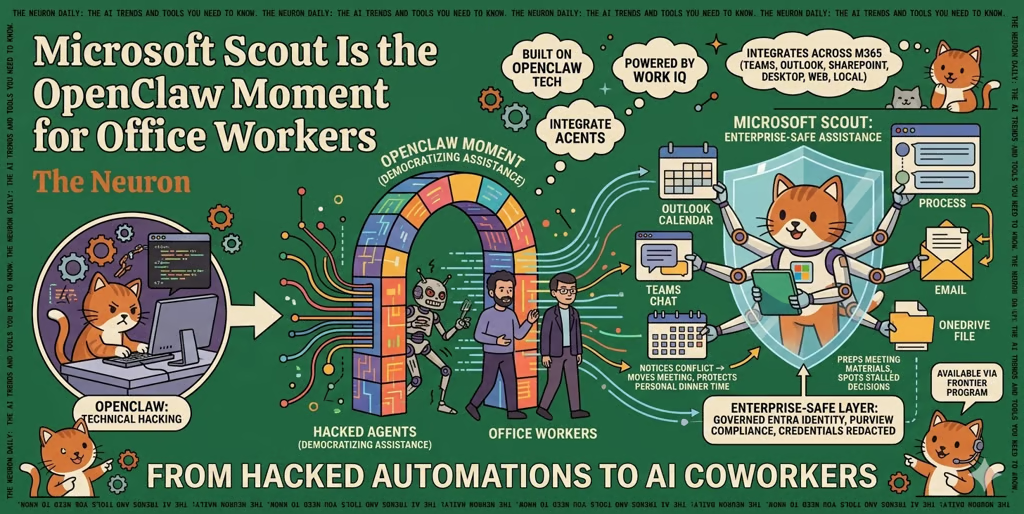
Scout connects across Microsoft 365, including Teams, Outlook, OneDrive, SharePoint, email, calendar, chats, contacts, cloud, desktop, web, and local resources through the desktop app. It is built on OpenClaw open-source technology and powered by Work IQ, Microsoft’s workplace intelligence layer. In plain English: Scout is designed to understand the messy shape of your workday, then help move things forward without needing to be prompted every single time.
Shahine gave me a personal demonstration of the setup and to see Scout in operation. Setup, by comparison to tools like OpenClaw and Hermes Agent, is friction-free. It's built for simplicity, to the extent it doesn't require training or walkthroughs.
Microsoft’s official Scout announcement gives examples like scheduling meetings, coordinating across time zones, prepping materials, spotting stalled decisions, and blocking calendar time before deliverables sneak up on you.
But the more interesting part is not any single feature. It is the product philosophy.
Scout is Microsoft’s clearest attempt yet to take the agentic AI experience that technical users have been hacking together with tools like OpenClaw and turn it into something normal people can actually use at work without needing a terminal, a prayer candle, and a deeply unhealthy tolerance for broken automations.
Shahine described Scout as a new category, but one still connected to the Microsoft 365 services people already use. That is the real strategic bet. Microsoft is not trying to convince workers to move their professional lives into a separate AI app. It is trying to make the agent live where the work already happens.
That is also why the “personal assistant” analogy lands so well, a phrase we've heard for 2-3 years but is just now beginning to look like a reality.
Most workers do not have an executive assistant watching their calendar, preparing meeting notes, catching conflicts, nudging tasks forward, and learning which interruptions matter. Senior executives may have that support. Everyone else usually gets Outlook reminders and vibes.
Scout is Microsoft’s argument that AI can democratize that layer of help.
In the demo Shahine walked through, Scout could prepare a user for upcoming meetings, recognize calendar conflicts, ask whether to move a meeting or protect personal time, and then remember that preference going forward. The example was small, but revealing: if Scout learns that dinner is protected time, it can apply that pattern later. If the requester changes, the rule may change too. Your teammate, your customer, and Satya Nadella probably do not all get the same calendar treatment.
That is the kind of judgment current productivity software is terrible at.
Traditional software gives you rules. Agents need to learn exceptions.
And that is where Microsoft’s enterprise DNA becomes the point. Scout is not just “OpenClaw, but in Microsoft colors.” It is OpenClaw-style autonomy wrapped in Microsoft’s identity, permissions, compliance, and governance stack. Each Scout agent operates under its own governed Entra identity. Its access can be scoped. Sensitive actions can require approval. Purview policies can still apply. Credentials are protected and redacted from logs.
That may sound like IT plumbing, because it is. But in enterprise AI, plumbing is destiny.
The reason most companies have not unleashed autonomous agents across the org is not that the demos are boring. It is that no one wants an overeager bot with access to email, calendar, files, expenses, and HR systems deciding today is a great day to improvise.
Shahine was blunt about the central challenge. It comes down to trust.
Trust, he said, is “the most critical and unknown” problem Microsoft has to solve. The reason is simple: “AI’s superpower is non-determinism.”
That one line explains both the promise and the terror of workplace agents. The same flexibility that lets an agent handle a new situation is the thing that makes people nervous when the agent can act. A deterministic tool can be limited. A non-deterministic assistant has to be trusted.
That is why Scout may be a more important Microsoft AI launch than it first appears. It is not just a personal productivity tool. It is a test case for whether large organizations will allow agents to become durable participants in work instead of temporary sidecars.
This connects directly to Microsoft’s broader push to make AI agents enterprise-safe. Agent 365, Work IQ, Frontier Suite, Copilot, and now Scout all point toward the same thesis: the next phase of workplace AI will not be won by the smartest answer box. It will be won by the company that can combine intelligence, context, identity, policy, and user trust into one system people can actually live with.
Scout is currently available through Microsoft’s Frontier program for select customers and Frontier organizations. Access requires Frontier enrollment, Intune policy configuration, an opt-in attestation, and a GitHub Copilot license.
So no, this is not broadly available to everyone yet. But the direction is clear.
The last phase of AI at work was about asking better questions. The next phase is about whether agents can remember what matters, act when you are not looking, and still stay inside the boundaries you would have chosen yourself.
That is a much harder problem than summarizing a meeting. It is also a much bigger opportunity.
If Scout works, the average knowledge worker’s day changes in a very practical way. Not magic. Not AGI. Just a competent assistant that gets better the longer it works with you.
That, ultimately, may be Microsoft’s real advantage here. The company is taking a class of tools that has mostly belonged to developers and power users and turning it into workplace software for everyone else.
As Shahine put it, “We’re all trying to figure out how to take technology and make it more accessible.”
That may sound less flashy than a model benchmark, but for the future of work, it might matter more. The AI assistant era is ending. The AI coworker era is arriving. And with Scout, Microsoft is making its case that the first version most workers will actually trust may come through the apps they already open every morning.
