Last updated August 20, 2026: This guide now reflects the GPT-5.6 model family, Codex inside the ChatGPT desktop app, Windows and Linux availability, mobile Remote, plugins, computer use, and the current usage-limit system.
You don't need to write code to have useful work for Codex.
Maybe you need a website built, 300 files sorted, research turned into a brief, or a repetitive browser task handled without losing an afternoon. Codex can take on jobs like these, use the tools it needs, and work through the steps toward a finished result.
Software development is still its specialty. But the current OpenAI documentation describes something much broader: an agent environment that can read and edit files, run commands, browse the web, use connected apps, create documents and data, and keep longer tasks moving in the background.
The easiest way to understand the difference is this: ChatGPT is something you ask. Codex is something you assign.
Autocomplete suggests the next line. A chatbot explains what to do. An agent can actually do the work, within the permissions you give it. You describe the outcome, Codex works through the task, and you review what comes back.
If terms like “refactor,” “repository,” and “test suite” mean nothing to you, that's fine. This guide starts at zero and shows where Codex fits, what it can do, and how to put it to work without pretending you've secretly been a developer all along.
Pro Tip from Corey: I use Codex for writing assistance, research, project planning, managing Notion, and plenty of work I once did in a normal chat window. Computer use, subagents, skills, plugins, and scheduled tasks make it much broader than a coding-only tool.
Here is the updated beginner's guide: what Codex is, where it runs, which models matter, what has changed, how usage limits and resets work, and how to get useful results without accidentally asking an agent to “make it better” and then watching it remodel the kitchen.
- First: what Codex actually is
- The biggest change: Codex is now inside ChatGPT
- Where you can use Codex now
- Which Codex models matter now
- What Codex includes beyond coding
- Plans, pricing, and what is included
- How Codex rate limits and full resets work now
- Why beginners get confused
- Where should a beginner start?
- The first big idea: Codex runs on context
- The second big idea: prompting Codex is delegation, not chatting
- The third big idea: the real power is in loops
- Why non-technical people should care
- The practical beginner playbook
- The bigger takeaway
First: what Codex actually is
Codex is an agent experience, not a single model.
The distinction matters because a model produces responses, while an agent can take actions. Depending on the task and permissions you grant, Codex can:
- inspect a repository and explain how it works;
- create or edit files;
- run shell commands, tests, linters, and build tools;
- review diffs and pull requests;
- use browsers, plugins, and connected services;
- operate supported desktop apps through computer use;
- create documents, spreadsheets, presentations, images, and interactive outputs;
- split complex work across subagents;
- keep work moving through scheduled tasks, cloud environments, and remote hosts.
That is why OpenAI's documentation spans much more than code generation. It covers the desktop app, web, cloud, CLI, IDE extension, configuration, AGENTS.md, skills, plugins, MCP, subagents, hooks, automations, the SDK, App Server, GitHub Actions, and non-interactive workflows.
With a normal chat model, you often ask for code and then do the operational work yourself: copy it, paste it, run it, debug it, and figure out what broke. With Codex, the pitch is different. You describe the outcome, give the agent the right context and permissions, let it work, and then review the evidence.
Less answer machine. More software delegate.
The biggest change: Codex is now inside ChatGPT
If you first tried Codex as a separate desktop app, the branding has moved under your feet.
In July 2026, Codex became part of the ChatGPT desktop app on macOS and Windows. Existing Codex projects, settings, and workflows carried over, and users can still make Codex the default view. The product is not disappearing; it is becoming one mode inside a larger workspace that also includes Chat and Work.
This is more than a logo shuffle. It means the same desktop environment can now hold coding tasks, research chats, file-based work, voice conversations, browser sessions, visualizations, and finished artifacts. Codex remains the agentic build-and-execute side of that experience.
The old mental model was: open a coding agent when you need code.
The new mental model is: open ChatGPT, choose Codex when the job needs an agent to inspect, change, run, verify, or coordinate work.
Where you can use Codex now
The current platform map is much broader than it was at the start of 2026.
ChatGPT desktop app
The desktop app is the most approachable command center. OpenAI now offers it for macOS, Windows, and Linux. The Linux version launched in preview in August for supported Ubuntu, Debian, and Fedora distributions on x64 and ARM64.
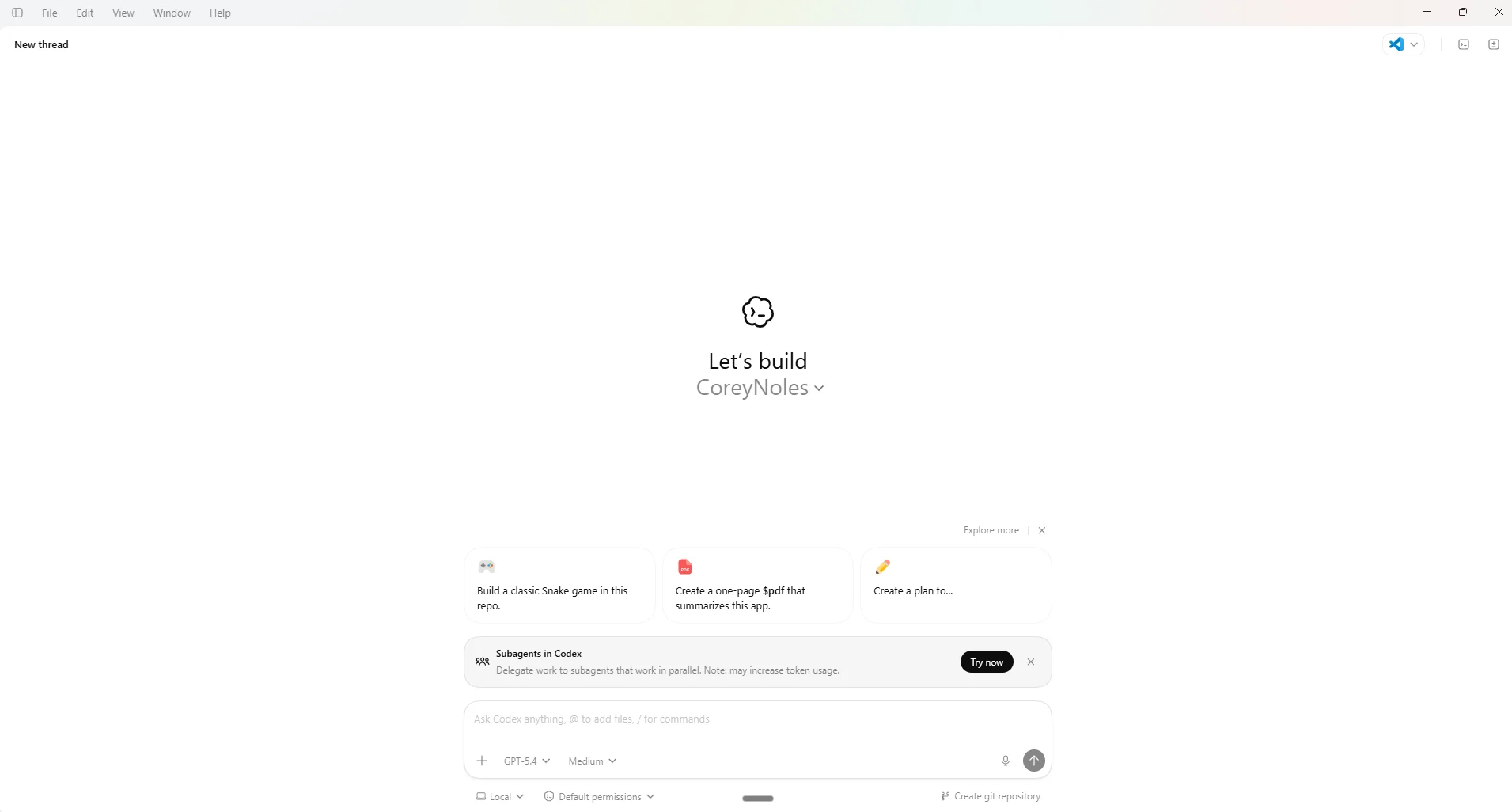
This is where you can keep multiple projects and chats visible, work with local files, run terminals, review changes, use plugins, schedule tasks, browse, create artifacts, and coordinate long-running work. On macOS and Windows, computer use can also let Codex see, click, and type in foreground desktop apps when enabled.
ChatGPT on the web and Codex cloud
Web and cloud workflows are useful when you want work to run away from your local machine, hand off a task, or use cloud integrations such as GitHub code review. Cloud environments can work on repository tasks in parallel without taking over your laptop.
There is one important wrinkle: local and cloud chats do not always expose identical controls. For example, OpenAI's current model guide says you cannot change the default model for Codex cloud chats at the moment.
Codex CLI
The CLI remains the fastest, lightest interface for people who are comfortable in a terminal. It exposes sessions, permissions, model selection, project instructions, review flows, scripting, and non-interactive execution directly.
As of August 20, 2026, the official Codex changelog lists Codex CLI 0.148.0 as the latest documented release. The number will keep moving, so the changelog is more reliable than any article that hard-codes a version and then goes to lunch.
IDE extension
The IDE extension remains the natural fit for developers who want Codex inside VS Code, Cursor, or another supported VS Code-based environment. It brings the agent, model controls, code context, diffs, and review workflow into the editor where the code already lives.
Remote on iOS and Android
Codex Remote reached general availability in June 2026. Through the ChatGPT mobile app, you can connect to a Mac or Windows host, start or continue work, review progress, and approve actions from iOS or Android. The host still does the actual local work, so it keeps access to that machine's projects, files, credentials, plugins, skills, and configuration.
This is not “the full desktop app squeezed onto a phone.” It is closer to a secure remote steering wheel for work happening on a connected machine.
API-key and third-party workflows
You can also authenticate the CLI, SDK, or IDE extension with an API key and pay for the tokens used. That path is useful for CI, automation, and custom agent systems, but it does not include every ChatGPT-hosted cloud feature. OpenAI's pricing documentation specifically calls out GitHub code review and Slack as examples of cloud features that are not included in API-key-only workflows.
Codex can also use supported OpenAI models through Amazon Bedrock, and developers can build on the Codex SDK, App Server, MCP server, GitHub Action, and non-interactive mode.
Which Codex models matter now
The original version of this guide discussed GPT-5.3-Codex and GPT-5.4. That is already old news.
OpenAI's current recommended family is GPT-5.6, with three main variants:
- GPT-5.6 Sol is the flagship option for difficult, open-ended work that needs strong judgment, deeper analysis, computer use, research, or polish.
- GPT-5.6 Terra is the balanced everyday workhorse for coding, tool use, analysis, and production tasks where you do not need Sol's full depth.
- GPT-5.6 Luna is the fast, lower-cost option for focused, repeatable, or high-volume work. It also stretches included usage much further.
The default Power setting uses GPT-5.6 Sol with medium reasoning. You can move toward faster or deeper settings, or open the advanced controls to choose a model and reasoning effort directly. Max gives one agent more time to think; Ultra splits suitable work across subagents in parallel. Most tasks do not need either one.
ChatGPT Pro users can also access GPT-5.3-Codex-Spark, a text-only research-preview model designed for near-instant coding iteration. It has separate usage limits and is not the general default.
Two retirement notes matter if you have saved configs or scheduled work:
- GPT-5.2 and GPT-5.3-Codex are already deprecated for Codex users signed in with ChatGPT.
- GPT-5.4 and GPT-5.4 mini retire from Codex on August 31, 2026. OpenAI recommends replacing them with GPT-5.6 Terra and GPT-5.6 Luna, respectively.
Those retirements do not automatically remove the models from the OpenAI API or API-key-authenticated Codex sessions. Subscription availability and API availability are related, but they are not the same thing.
What Codex includes beyond coding
Codex still shines on software engineering: understanding repositories, building features, fixing bugs, writing tests, reviewing changes, working with pull requests, and preparing code to ship.
But the feature list has expanded into a broader workbench:
- Browser and Chrome support: Codex can browse, work across tabs, use signed-in Chrome context with the extension, and use Developer mode for deeper inspection of the DOM, console, network traffic, and page performance.
- Computer use: On supported macOS and Windows setups, Codex can operate foreground desktop apps by seeing, clicking, and typing.
- Plugins and MCP: Plugins bundle skills, connected apps, and MCP configuration into reusable workflows. They are available in the desktop app, CLI, and IDE extension.
- Skills and Record & Replay: Skills teach Codex repeatable procedures. On macOS, Record & Replay can turn a demonstrated workflow into a reusable skill.
- Subagents and Ultra: Complex jobs can be split into parallel workstreams when the work actually divides cleanly.
- Scheduled tasks: A task can run once or recur on a schedule, and a thread can wake up later with its existing conversation context.
- Sites and visualizations: Codex can build hosted websites and create interactive charts, diagrams, dashboards, and explainers.
- Rich artifacts: It can create and inspect documents, spreadsheets, presentations, PDFs, images, and other files inside the workspace.
- Voice: ChatGPT Voice can help start, check, and steer work across Chat, Work, and Codex, although the tasks it launches still use your Codex allowance.
- Memories and Computer History: Optional memory features can carry forward preferences, workflows, repository conventions, and—on supported macOS plans and regions—recent computer context.
- Imports: The desktop app can import setup and recent work from Claude Code, Claude Cowork, and Cursor; the CLI supports imports from Claude Code and Cursor.
This is why “coding agent” is accurate but incomplete. Software work remains the core use case, but the product is steadily becoming a general agent workspace for people who build, analyze, research, write, and operate.
Plans, pricing, and what is included
Codex is currently included with ChatGPT Free, Go, Plus, Pro, Business, Edu, and Enterprise plans. ChatGPT Work and Codex share usage, so work done in one can draw from the same allowance as the other.
As of this update, OpenAI lists:
- Free: $0 per month for quick coding tasks and trying the basic experience.
- Go: $8 per month for lighter use.
- Plus: $20 per month, with Codex on web, CLI, IDE, and iOS; cloud integrations; GPT-5.6 Sol, Terra, and Luna; and the ability to buy more credits.
- Pro: $100 or $200 per month, with 5x or 20x the Plus rate limits and access to Codex-Spark. The $200 tier includes unlimited desktop voice, but not unlimited Codex tasks.
- Business: $20 per user per month when billed annually for two or more users, or $25 monthly, with a dedicated workspace, admin controls, larger cloud virtual machines, and business data excluded from training by default.
- Enterprise and Edu: custom plans with additional security, governance, audit, retention, and data residency controls.
- API key: usage-based billing for the CLI, SDK, or IDE extension, with model availability tied to the models available to that API key.
Prices and limits are exactly the sort of facts that age like an avocado on a dashboard, so check the live Codex pricing page before making a purchasing decision.
How Codex rate limits and full resets work now
This is the part that has caused the most confusion because three different things get called a “reset.”
First, normal included usage runs on a shared five-hour window for local messages and cloud chats. Additional weekly limits may apply. The amount one message consumes depends on the model, reasoning level, context, tool use, caching, and whether the task runs locally or in the cloud. A tiny Luna task and a sprawling Sol Ultra run are not remotely the same snack.
Second, Plus and Pro users can buy additional ChatGPT credits when they exhaust included usage. Pro's 5x and 20x tiers also provide larger included limits than Plus.
Third, OpenAI has been issuing full-account resets outside the normal window much more often than it did earlier in Codex's life. The independent Codex Forecast reset tracker watches for account refills, cross-checks OpenAI staff announcements and compares them with OpenAI's status history. As of August 20, 2026, it had recorded eight resets in the previous 30 days, with an average wait of 3.8 days between resets. In plain English: OpenAI has recently been pushing a full reset about twice a week, not twice a month.
In June, OpenAI moved toward a more predictable mechanism: banked rate-limit resets. Eligible Plus and Pro users received one free reset when the feature launched and could earn additional resets through a limited referral promotion. Those banked resets were usable for 30 days, and a later CLI update added controls for choosing which reset credit to redeem.
So the honest answer to “How often do full resets happen?” is: recently, about eight times per month, or roughly twice a week—but there is no fixed schedule. That figure describes the tracker's rolling 30-day record on August 20, not a contractual plan benefit. The documented cadence is still the five-hour window plus possible weekly caps. The extra full resets are discretionary; the banked-reset system is the productized version you can actually see and redeem when one is available.
The tracked resets are real and useful extra capacity. Just do not budget them as guaranteed capacity until OpenAI puts a reset frequency into the plan terms.
Why beginners get confused
Part of the confusion is that “Codex” now refers to an agent experience spread across several surfaces, while the models powering it change on a different schedule.
The stack looks like this:
- Codex is the agent and workflow experience.
- Models such as GPT-5.6 Sol, Terra, and Luna power the work.
- Surfaces such as desktop, web, cloud, CLI, IDE, and Remote determine where and how you interact with it.
- Skills, plugins, MCP, hooks, project instructions, permissions, and environments determine what it knows and what it can do.
Once you separate those layers, the product makes much more sense.
Where should a beginner start?
Start with the surface that lowers your anxiety, not the one that makes you look the most like someone in a hoodie standing in front of six monitors.
If you are non-technical, semi-technical, or terminal-averse, start with the ChatGPT desktop app. Open a folder or begin a projectless chat, describe the result you want, attach relevant files, and ask Codex to explain what it plans to do before it changes anything.
If you already spend your day in VS Code or Cursor, use the IDE extension. It keeps the workflow familiar and makes it easy to inspect code and diffs.
If you are comfortable in the terminal, the CLI is still the fastest way to see how Codex thinks about context, permissions, commands, and verification.
If you want work to continue away from your machine, try a cloud task or pair Remote with a Mac or Windows host.
Pro Tip from Corey: For non-technical users, the desktop app is still the cleanest on-ramp. You can see the files, activity, sources, and outputs without pretending a black terminal window is a personality trait.
The first big idea: Codex runs on context
One of the most useful concepts is AGENTS.md.
Agents do not automatically understand your project the way a long-time teammate does. An AGENTS.md file gives Codex durable project instructions: what the repository does, where important files live, how to run tests, what conventions matter, what “done” looks like, and what the agent should avoid touching.
You can now use /init to generate a starter project-instructions scaffold in the app or CLI. Treat the result as a beginning, not sacred text. The useful version is the one that reflects how your project actually works.
Skills add another layer. Where AGENTS.md explains the project, a skill can explain a repeatable procedure—how to publish a release, analyze a spreadsheet, create a branded document, or run a specific review workflow. Plugins can package those skills together with apps and MCP servers.
If Codex produces weak work, the first question should not always be “Which smarter model should I buy?” Often the better question is “What context did I fail to provide?”
Good agent work is usually good context work wearing a cool trench coat.
The second big idea: prompting Codex is delegation, not chatting
A normal chat prompt can be vague and still be useful. An agent prompt benefits from being operational.
Tell Codex:
- what outcome you want;
- where it should start;
- what constraints it should respect;
- how it should verify success;
- what it must not change;
- what evidence you want in the final report.
A strong beginner prompt looks like this:
Explain this project in plain English. Identify the files involved in login, propose the smallest safe change to add passkeys, and wait for my approval before editing. If I approve, implement it, run the relevant tests, and summarize the changes and remaining risks.
That prompt gives the agent an outcome, scope, sequence, approval boundary, verification step, and reporting format.
Also learn to steer. You do not always need to stop a running task and begin again. Current Codex surfaces can accept follow-up direction while work is underway, and separate side conversations can help you ask questions without derailing the main task.
The third big idea: the real power is in loops
Codex becomes more than a code generator when it participates in the whole work loop.
That might mean:
- understanding an issue;
- locating the relevant code;
- proposing a plan;
- making the change;
- running tests;
- reviewing the diff;
- responding to feedback;
- updating documentation;
- preparing the pull request;
- checking back later through a scheduled task.
The same pattern applies outside engineering. A research task can gather sources, produce a report, turn the findings into slides, and schedule a later check for updates. A content workflow can pull context from plugins, draft an article, create images, and save the result in the right system.
The value is not “it wrote a function.” The value is “it helped carry the work from unclear request to reviewable result.”
Why non-technical people should care
Because more work is becoming a coordination problem, not just a typing problem.
A founder, product manager, designer, marketer, analyst, or operator may not merge production code. But they can use Codex to research, scope, prototype, document, analyze, review, and delegate meaningful chunks of work.
That does not eliminate the need for strong engineers. It changes the leverage of everyone around them.
It also matches the broader shift we have been covering at The Neuron: coding agents change how work is organized, not just how fast someone types code. Our earlier deep dive on the Codex app focused on the same center-of-gravity shift from manually doing every step to orchestrating agents, context, review, and iteration.
In the months since, OpenAI has pushed that idea much further. Codex now lives inside ChatGPT, works across three desktop operating systems, reaches phones through Remote, connects to outside systems through plugins, and handles many deliverables that are not code at all.
The practical beginner playbook
If you are starting from zero, take this path:
- Pick one surface. Start with desktop, IDE, CLI, or web. Do not try to learn the entire product map in one weekend.
- Use Codex for understanding first. Ask it to explain a project, find relevant files, summarize changes, or map a workflow before asking it to edit anything.
- Write down the operating instructions. Add an
AGENTS.mdfile and improve it as you learn what the agent needs. - Ask for a plan on risky or ambiguous work. Planning is useful when it exposes assumptions, not when it becomes a 40-page ceremonial scroll.
- Define verification. Tell Codex which tests, checks, sources, or acceptance criteria prove the task is complete.
- Review permissions and diffs. Full access and computer use are powerful. Use the narrowest access that still lets the job succeed.
- Choose the model for the task. Sol for hard, ambiguous work; Terra for everyday production; Luna for fast, repeatable volume.
- Graduate to advanced features when repetition appears. Turn repeated instructions into skills, connected workflows into plugins, and recurring checks into scheduled tasks.
The goal is not to become a Codex feature historian. The product changes too quickly for that job to be fun.
The goal is to learn how to assign work clearly, give an agent useful context, choose sensible permissions, and judge the evidence it returns.
The bigger takeaway
The most important thing about Codex is not that OpenAI keeps releasing better coding models. It is that the company is turning the coding agent into a general work environment—configurable, multi-surface, connected to outside tools, capable of parallel execution, and built around reviewable outputs.
That is a bigger claim than “AI helps you code faster.”
It suggests that more software and knowledge work will happen through agents that can inspect context, take actions, coordinate tools, produce artifacts, and stay in the loop long enough to finish something useful.
For beginners, that is actually good news.
You do not need to become a terminal wizard on day one. You do not need to memorize every model name. And you definitely do not need to pretend agents are magic.
You need to learn the new core skill: how to give work enough context, structure, permission, and review that an agent can help carry it.
That is Codex 101.
And honestly, it may end up being Work 101 for the rest of this decade.