


Welcome, humans.
Here’s a hard truth for you: your company spends half its salary budget on meetings… then loses everything discussed within a week.
In our latest podcast episode, Otter.ai CEO Sam Liang breaks down how his company turned meeting transcription into a $100M+ business by treating voice conversations as enterprise knowledge that’s central to your business.
The conversation gets specific on stuff like real-time AI sales coaching that's “almost like cheating in an exam”, AI avatars that attend meetings on your behalf, and why one financial company found Otter delivers the equivalent value of one full-time employee for every 20 seats purchased. Special shout out to this video’s sponsor, SAS!
Listen and our watch now on YouTube | Spotify | Apple Podcasts.
Here’s what happened in AI today:
- OpenAI released GPT Image 1.5, which topped the AI image editing charts.
- Google Labs launched “CC”, a tool for personalized morning briefings.
- OpenAI rolled back ChatGPT's automatic model router.
- Adobe Firefly added text-prompt video editing, FLUX.2, and Topaz Astra for 4K upscaling.

OpenAI’s new image model has arrived… and it seems like the fastest, smartest image generator yet…
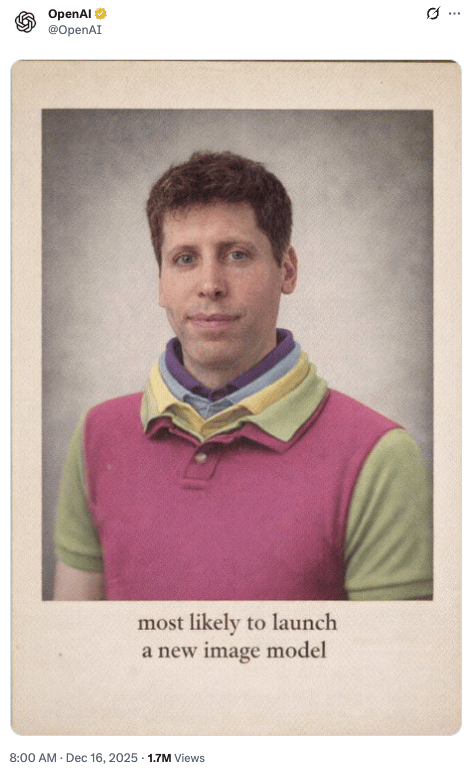
News brief: OpenAI’s new image model, explained
Y’know how when you ask ChatGPT to generate or edit a single image, it takes at least 30 seconds to wait for it, only to find the text was misspelled or your edits changed everything except what you actually wanted?
Well, OpenAI just released GPT Image 1.5, and it's 4x faster while being significantly better at actually following your instructions. The model is rolling out now to all ChatGPT users and is available in the API as GPT-Image-1.5 (docs).
Here's what makes it different: The new model preserves what matters. When you ask for edits, it changes only what you specify while keeping lighting, composition, and people's appearance consistent across multiple edits.
Translation: no more accidentally transforming your subject's entire face into a hideous Renaissance painting alternate universe version of itself when you just wanted to change the background.
Where GPT Image 1.5 excels:
- Precise editing: Add, subtract, combine, blend, or transpose elements without losing the image's essence.
- Text rendering: Finally handles dense, small text accurately (think readable newspaper layouts, not jumbled letters).
- Instruction following: Creates intricate compositions with proper relationships between elements—like an actual 6x6 grid with 36 different objects, each in the right spot.
- Creative transformations: Apply preset styles instantly; turn photos into movie posters, 80s fitness ads, or fashion campaigns while preserving key details.
- Speed: Up to 4x faster than the previous version, so you can iterate without the wait.
OpenAI also launched a dedicated Images interface in the ChatGPT sidebar with preset filters, trending prompts, and one-time likeness uploads (kinda like Sora Cameos) for easier creation.
How does it stack up against the competition? According to independent benchmarks, OpenAI dominates:
- Text-to-image: GPT Image 1.5 leads with 1264 points on the Artificial Analysis leaderboard—a 29-point lead over second place.
- Image editing: ChatGPT's image model tops LM Arena at 1409 points, narrowly beating Google's Nano Banana Pro (2K) by 3 points, and has a 6 point lead over Nano Banana Pro on Artificial Analysis’ image editing leaderboard.
- Improvements: +147 points in text-to-image and +245 points in editing over GPT Image 1.0 on LM Arena.
Think of it like this: GPT Image 1.5 = speed and precision edits. Nano Banana Pro = production-grade assets with additional enterprise features.
Why this matters: AI image generation just crossed a critical threshold. For the first time, these tools can actually preserve what you care about while changing what you want… reliably. No more generating 50 versions hoping one works.
If you create visual content for work, try the new ChatGPT Images interface to test it out or test both models head-to-head in LM Arena or AA Image Arena to see which fits your workflow better.
P.S: We tested it on the same challenge we gave Nano Banana Pro in our live-demo of GPT-5.2 on Friday, and this is what it created.

FROM OUR PARTNERS

Want to see how one of the internet’s largest platforms, Reddit, is using AI to boost SOC efficiency? Watch this on-demand webinar for an inside look at Reddit’s AI strategy - straight from their security team.
Here's the challenge: your security operations center needs to scale, but traditional approaches can't keep up. Reddit knows this firsthand managing security for millions of daily users.
In this webinar, Nick Fohs (Senior Manager of Enterprise Systems & Security at Reddit) and Thomas Kinsella (Co-founder at Tines) break down how to build an AI SOC that actually adapts to your team's needs. You'll see Reddit's real implementation, learn how to combine AI agents with rule-based workflows, and watch a live demo of building your own AI SOC from scratch.
Whether you're just starting to explore AI in security or already deep in the weeds, you'll walk away with practical steps you can implement immediately.
Watch the on-demand webinar here.

Prompt Tip of the Day
Tired of juggling docs, Slack threads, and random context across 12 tools? Product manager Amir Klein shared a 3-step system with Lenny’s newsletter for building your “second brain” using ChatGPT’s “Projects” feature:
- Create its personality using ChatGPT to write custom instructions for the exact thought partner you need.
- Feed it everything: PRDs, decks, Excel sheets, Slack channels exported as PDFs (everything is text!).
- Let it cook on sign-up forms, strategy docs, prototypes, roadmaps, whatever needs doing.
Klein's Project now holds hundreds of files and handles tasks that used to drain his mental energy.
TL;DR: This isn't about outsourcing judgment. It's about clearing mental overhead so you can focus on what actually matters: your reasoning, creativity, and decision-making.
Treats to Try
*Asterisk = from our partners (only the first one!). Advertise to 600K readers here!

- *Wispr Flow turns your speech into clean, final-draft writing across email, Slack, and docs. It matches your tone, handles punctuation and lists, and adapts to how you work on Mac, Windows, and iPhone. Start flowing for free today.
- Gemini 2.5 Flash Native Audio now handles complex multi-step voice agent tasks with 90% instruction adherence (up from 84%) and leads competitors at 71.5% on function calling benchmarks—like building a customer service bot that accurately fetches real-time data mid-conversation without breaking flow.
- CC from Google Labs scans your Gmail, Calendar, and Drive to send you a personalized morning briefing of what's ahead, and you can email it anytime to add tasks or get help.
- Adobe Firefly now lets you edit videos with text prompts (type “change the sky to overcast“ or “zoom in on the subject“), plus it's adding FLUX.2 for images and Topaz Astra for upscaling videos to 4K.
- DoorDash launched Zesty, a social app for finding restaurants: ask for “brunch spots good for groups“ or “a low-key dinner in Williamsburg for introverts“ and it pulls recommendations from DoorDash, Google Maps, and TikTok.
- Okara lets you chat with 20+ open-source models (Llama, Qwen, DeepSeek) without losing context when you switch; everything's encrypted and never used for training, and includes web/Reddit/X search and image generation.
Around the Horn

Fun stuff! Only two failed…can you guess who they are??
- OpenAI quietly rolled back ChatGPT's model router (the system that automatically sent queries to reasoning models) for free and $5/month users; it was too expensive and hurt daily active users, so they're back to the default fast model with manual reasoning access.
- NVIDIA acquired SchedMD, the company behind the Slurm job scheduler, and said it would keep distributing the software as open source.
- Meta's AI glasses now amplify the voice of whoever you're talking to in noisy environments (restaurants, bars, trains); adjust amplification by swiping the temple, similar to AirPods' Conversation Boost.
- Gallup reported 45% of US employees used AI at work at least a few times a year in Q3 2025, up from 40% in Q2 2025.

FROM OUR PARTNERS
Most AIs sound confident—even when they’re wrong.
Guru grounds your entire tech stack in verified, permission-aware company knowledge so you can trust every insight, every time.
Join thousands of companies that have made their AI reliable, explainable, and compliant.

Tuesday Tool Tip
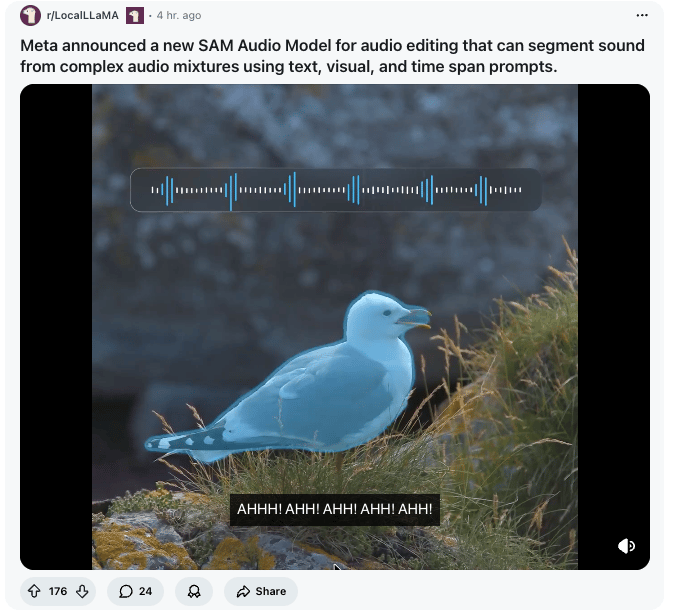
Ever recorded a podcast with a barking dog in the background? Or filmed a street performance where traffic drowns out the music?
Meta's SAM Audio lets you isolate specific sounds from complex audio mixtures using three intuitive prompts:
- Text: Type "dog barking" to extract that sound.
- Visual: Click objects in video to isolate their audio.
- Time span: Mark exact segments where target audio occurs.
Use cases: Remove background noise from recordings, isolate instruments from live bands, strip mouth noises from podcasts, separate dialogue from background sounds in video calls, or clean up audience noise from performances.
One Reddit user noted the model can even identify when a commentator accidentally taps their microphone—just prompt "tap on the microphone" and it finds the moment.
Try it: Available on GitHub, Hugging Face, or test in Meta's Segment Anything Playground here.
A Cat’s Commentary

