


January kicks off with big ambitions, fresh goals, and everyone promising themselves "this is the year I get organized." But two weeks in? Most of those resolutions crash into reality: packed inboxes, tight deadlines, and the same workflow bottlenecks as last year.
This January Prompt Tips of the Day collection cuts through the noise with battle-tested AI techniques that actually stick. We're testing the latest ChatGPT, Claude, Gemini, and GPT-5 prompt strategies to see which ones survive real work—think Q1 planning decks, research deep-dives, content calendars, and "can you turn this mess into something usable?" requests.
Inside: meta-prompters that fix your bad prompts, frameworks for smarter research and writing, system instructions that make AI think like your best analyst, and concrete templates you can steal and customize in 30 seconds.
Every tip comes with copy-paste examples—no theory, no fluff, just prompts that work when you're three coffees deep and need results now.
Bookmark this page. Future You (staring down February deadlines) will thank you.
January 2026 Prompt Tips of the Day
Jan 31
The Claude Code Team Just Shared How They Actually Use Claude Code (And It's Wild)
You're probably using Claude Code wrong.
Not because you're doing anything bad, but because you haven't seen what's possible when you really lean into it. The Claude Code team uses their own product in ways most users never discover, and Boris Cherny just dropped their playbook on X with 10 tips that'll change how you think about AI coding.
Here's what they actually do:
The Parallel Processing Hack
The #1 tip from the team? Run 3-5 git worktrees simultaneously, each with its own Claude session. Some engineers set up shell aliases (za, zb, zc) to jump between worktrees in one keystroke. Others maintain a dedicated "analysis" worktree just for reading logs and running BigQuery queries.
Think of it like having five expert developers working on different parts of your codebase at once.
Plan Mode Is Everything
For complex tasks, the team starts in plan mode every single time. They pour energy into the plan so Claude can nail the implementation in one shot. One engineer even has one Claude write the plan, then spins up a second Claude to review it as a staff engineer.
When something goes sideways? They don't keep pushing. They switch back to plan mode and re-plan from scratch.
Your CLAUDE.md File Is Your Secret Weapon
After every correction, team members tell Claude: "Update your CLAUDE.md so you don't make that mistake again." Claude writes rules for itself, and the mistake rate measurably drops over time.
One engineer goes further, having Claude maintain a notes directory for every project that gets updated after each PR.
Other Power Moves:
- Build custom skills for anything you do more than once daily. One engineer built a /techdebt command that finds and kills duplicated code at the end of every session.
- Enable the Slack MCP and paste bug threads directly into Claude with "fix." Zero context switching.
- Use voice dictation (fn x2 on macOS). You speak 3x faster than you type, and your prompts get way more detailed.
- Append "use subagents" to complex requests to throw more compute at the problem.
- Point Claude at the "bq" CLI for analytics queries. Some team members haven't written SQL in 6+ months.
For Learning:
Enable the "Explanatory" output style in /config to understand the why behind changes. Ask Claude to generate visual HTML presentations explaining unfamiliar code (it makes surprisingly good slides). Have it draw ASCII diagrams of new protocols.
Why This Matters:
Most people use Claude Code like a faster autocomplete. The team uses it like a development partner that can handle five tasks in parallel, write its own operating procedures, and automate entire categories of work. The gap between those two approaches is the difference between modest productivity gains and fundamentally changing how you ship code.
What You Can Try Today:
Start with one parallel worktree. Add "Update your CLAUDE.md" to your next correction. Build one custom skill for something you do repeatedly. The compounding effects stack fast.
The tools are the same for everyone. The difference is in how you use them.
Jan 30
There’s an official prompting guide for Genie 3, and it's packed with insights that apply way beyond just building interactive game worlds.
Here's their framework in three parts: Environment (your landscape and style), Character (what moves and how), and World Sketch (the preview image that sets everything).
And then there’s their universal prompting principles:
- Use game-like language. DeepMind explicitly says gaming terminology builds “richer environments with more precise control.” Instead of “the character moves elegantly,” try “the character glides forward, leaving a trail of blue light.”
- Evoke mood through sensory details. Don't just describe, but make it feel. “Dimly lit with mysterious smoke on the ground” beats “dark environment.”
- Keep it direct and action-oriented. Short declarative sentences. Like that.
Our favorite insight: When your prompt fails, use Gemini to “rewrite, expand, and elaborate” it. Meta-prompting for world-building prompts? Very meta, VERY useful.
Jan 29
Stop writing custom instructions for every project. Vercel just launched skills.sh—an open registry that teaches AI agents procedural knowledge through simple one-line commands.
Here's how it works: Instead of prompting Claude Code with “Here's how to deploy to Vercel, here are the best practices for React components, here's our testing philosophy...” you just run:
bash
- npx skills add vercel/react-best-practices
- npx skills add vercel/deployment
The agent now knows those workflows. No copy-pasting documentation or context window bloat required.
Why this matters: The platform hit ~21K installs in 6 hours after launch (now at 25,209 total installs across 565+ skills). It works with 16+ agents including Claude Code, Cursor, Windsurf, GitHub Copilot, and yes—Clawd Moltbot.
Top skills to try:
- vercel/react-best-practices (48.7K installs).
- vercel/web-design-guidelines (37K installs).
- shadcn/ui-implementation (popular for component work).
The real power move: Create your own company skills. Your team's API patterns, deployment checklist, code review standardspackage them once, share the npx command. Every agent on your team instantly has your playbook.
Skills follow a simple format: SKILL.md files with YAML frontmatter describing what the skill does, plus optional scripts and reference docs. Browse the registry to see examples, or check the spec to build your own.
The standardized ecosystem for teaching agents procedural knowledge just arrived. Time to start using it if you haven’t yet!
Jan 28, pt. 1
There’s an ancient proverb: Give a cat a prompt, and he’ll use AI for a day. Teach a cat to prompt, and he can use AI for the rest of his life.
Well, here’s the ultimate prompt tip: Don't start with a prompt at all.
Instead, tell AI your goal, then have it interview you. You'll get better output, faster.
Okay, okay, here’s the prompt to do this: “Here's my goal: [X]. Ask me a series of 10+ questions to figure out exactly what you need from me to complete this goal end to end.“
You can even have it reverse engineer the whole conversation into a prompt at the end!
Now, here's the deal: a lot of folks on Reddit say the "ask questions first" hack is outdated because modern AI tools should BUILD THE PLAN WITH YOU rather than just asking questions.
It's less about getting the AI to interview you, and more about forcing it to show its work BEFORE it starts working. You're essentially making it write the specification for its own task, which you then approve or adjust.
See, a new pattern has gotten popular versus trying to craft “the perfect prompt.” Make AI create a plan first, that you approve, that it then executes
This “plan/spec mode” (in tools like Claude Code) constrains where AI improvises, allowing you to define boundaries upfront instead of fixing problems after.
What Plan/Spec Mode Actually Is
Tools like Claude Code, Cursor, Copilot, etc. all now have built-in "plan" or "spec" modes. Essentially, that means:
Instead of: "Hey AI, build me a website" You do: AI creates a detailed plan/specification first, you review/approve it, THEN it executes
This Reddit comment breaks this down really well with a racing analogy - you need "walls made of tires" to give the AI a safe track to run on. For coding agents specifically, they suggest:
- Specs (the backbone): Goals and strategies written in a markdown file - this becomes the "constitution" the agent follows
- Tests (the skin): How the agent knows if it's doing well or poorly
- The agent (muscles): Does the actual work
- You (brain): Oversees and adjusts
And that's not all. Other solutions include:
- OpenAI Cookbook's PLANS.md approach - Create a markdown template that AI fills out with sections like "Goal," "Milestones," "Implementation Steps," etc. It becomes a "living document" the AI updates as it works. Example here
- Two-file workflow - Some developers use:
- requirements.md (what you want)
- plan.md (how to build it)
- tasks.md (step-by-step checklist)
- Then feed these files to AI for execution.
- Simple two-step prompting:
- First: "Create a detailed plan for [task] and save it"
- Review/edit the plan
- Then: "Now implement the plan you created"
- Custom workflows - People are sharing prompt templates on GitHub (like this one) that recreate plan mode in regular chat interfaces.
The universal pattern across all approaches:
- Create specification/plan (in file or chat)
- Human reviews/approves
- Execute against that spec
So if you're comfortable in the Claude Code tool, use plan mode. If you're not... keep scrolling.
Why This Matters (Even If You're Not A Coder)
The key insight isn't really about coding - it's about constraining the AI's improvisation space before it starts generating.
Think of it like this:
- Old way: Give AI a task → get varying quality results → fix what's wrong
- Plan/spec way: Define boundaries/requirements first → AI works within those → much more consistent results
How Regular People Can Apply This
So if you’re not ready to try a CLI tool like CC or Codex, you can actually recreate plan mode in ChatGPT/Claude/Gemini's basic user plan with prompting, since they don't have built-in plan modes yet.
The fancier solutions like MCP servers, multiple markdown files, etc are mostly for developers doing complex coding projects, while this solution should work well for your needs.
Here's a basic version to get you started:
"Before starting [task], work in phases:1. Ask clarifying questions about [request/context]2. Propose your approach for [how to do it]3. Review your initial plan to ensure it aligns with [my goals]4. Based on your review, write a final plan showing: [what you'll do], [steps], [potential risks]Keep it scannable but detailed. Wait for my approval before executing."
You can then customize that for your more specific needs. Here's a few examples to trigger your imagination:
For writing:
"Before writing this blog post, create an outline with:
- Target word count for each section
- Tone requirements
- 3 must-include points
- 2 things to definitely avoid
Then show me the outline for approval before writing."
For research:
"Before researching X topic, tell me:
- What sources you'll prioritize
- What questions you'll try to answer
- How you'll organize findings
- What you'll exclude as out of scope
Then I'll approve the plan."
For analysis:
"Create a specification for analyzing this data:
- Metrics you'll calculate
- Comparisons you'll make
- How you'll present findings
- Edge cases you'll watch for
Wait for my approval before analyzing."
Jan 28, pt. 2
Somebody asked for an OpenClaw (formerly Clawdbot & Moltbot) tutorial, so here we go: How do you use it without destroying your computer or inviting hackers to go full Parasite mode on your HDD? Nate Herk's got you covered:
1. The Setup: Don't run this on your main machine. Because OpenClaw has shell access (it can delete files or spend money), installing it on your personal laptop is risky (the so-called "blast radius"). The Fix: Use a VPS like Hostinger instead of a $600 Mac Mini. The Install: SSH into your server, create a dedicated "Claude" user (don't run as root!), and use the one-line installer.
2. The Strategy: Hunt for "Unknown Unknowns." Most of us use AI reactively ("Write this email"). The real magic is proactivity. Try Alex Finn's "Employee" Prompt: Instead of assigning tasks one by one, set expectations during onboarding. Tell it: "I need an employee taking as much off my plate as possible. Monitor my business and build things that would help improve our workflow." The Result: Alex woke up to find his bot had autonomously researched competitors, identified that "article" posts were trending on X, and coded a new "Article Writer" feature into his SaaS overnight. Whoa.
TL;DW? Treat it like a remote intern. Give it a dedicated email address, set it up on a cheap server, and ask "What can you do for me?" rather than telling it what to do.
Warning: If you're not technical, don't install this on your main computer. Run it on a VPS to keep your personal files safe from any "agentic mishaps." In fact, if you're not technical, try learning Claude Code/Cowork first. Watch this interview with Boris, the creator of Claude Code—he reveals the exact "Vanilla" setup that let him stop writing code by hand entirely for the last two months.
His top 3 tips:
- Embrace "Multi-Clauding": Don't watch the bot think. Boris runs 5–10 sessions in parallel. Kick off a task, open a new tab, kick off another.
- The Claude.md Hack: Create a simple text file in your repo. Every time the AI makes a mistake, tag it to update that file with a new rule. It's "Compounding Engineering"—your AI gets smarter every week.
- Trust the Plan: With Opus, "Once the plan is good, the code is good." Don't stress syntax; spend energy refining the written plan, then hit auto-accept.
If you're REALLY feeling OpenClaw fever, watch creator Peter Steinberger on TBPN—a bit spicy, but he's awesome. Want more? Check out our Prompt Tip of the Day Digest for January.
Jan 28, pt. 3
More on the Claude Interactive Apps front:
Anthropic announced Monday that Claude can now run interactive apps directly inside the chat interface — and we're not talking about simple integrations. Tools like Slack, Figma, Asana, and Canva now "open as interactive apps right inside of chat," letting you draft messages, update project timelines, and design presentations without ever leaving Claude.
The feature builds on Anthropic's Model Context Protocol (MCP), which the company open-sourced late last year. But this is the first time we're seeing it work at this scale with major workplace tools.
Here's what you can actually do:
- Draft and send Slack messages directly in Claude
- Update Asana project boards and timelines
- Edit Figma designs without switching tabs
- Create presentations in Canva while chatting with the AI
- Use Google Drive, Gmail, and Calendar with real-time sync
The apps literally render inside Claude's interface — not just as links or previews, but as fully interactive windows where you can click, type, and navigate.
Why this matters:This is Anthropic's bet on AI as a workplace operating system. While OpenAI has been focused on monetizing ChatGPT with ads and Microsoft is building custom AI chips to reduce Nvidia dependence, Anthropic is going full-force into enterprise productivity.
The timing is strategic. Apple is reportedly struggling with AI direction after failed billion-dollar talks, and Google just got hit with an EU ruling requiring Android to open up to rival AI systems. Anthropic is positioning Claude as the neutral AI layer that works across all your tools.
The catch: Right now, the feature is available to Claude Pro, Team, and Enterprise users. Free-tier users (present company included) will have to wait. And while the initial app lineup is strong, the real test is whether developers build MCP integrations at scale — or if this becomes another API graveyard.
Jan 27
Claude just got way more useful. Instead of copying and pasting between apps, you can now use Slack, Asana, Figma, Canva, and others directly inside Claude's chat window.
The workflow: Go to claude.ai/directory → Click "Connect" on any tool → Authenticate → Start asking Claude to do things in those apps.
What you can do:
- Draft formatted Slack messages with live preview
- Build Asana project timelines that appear in chat
- Generate Figma diagrams from text descriptions
- Create interactive charts from data (Amplitude, Hex)
- Search and preview Box files inline
Look for the tools icon in the bottom corner of your chat box to see what's connected.
This shifts Claude from AI advisor to hands-on operator—users report it's like having the tools follow you into the conversation instead of the other way around. Available now for Pro+ subscribers, with Claude Cowork integration coming soon.
Jan 26
Forget scrolling through news or checking your inbox first thing—try this "brain warm-up" prompt instead.
Productivity writer Alex Morgan shared a simple morning ritual: before diving into your day, ask yourself (or your AI chatbot) one open-ended question that invites curiosity rather than demanding answers. It takes under two minutes and helps break autopilot mode before the chaos begins.
Sample prompts to try:
- "Give me one small thing to notice today."
- "Share one interesting assumption I might hold without realizing."
- "Suggest an overlooked detail worth noticing on my commute."
- "Offer a single question that could change my usual perspective."
The key is to pause after asking. Let the reflection settle in the background while you brush your teeth or make coffee, often the clearest insights emerge unconsciously as you go about your routine.
Why this works: Traditional morning routines push you toward checklists or deep meditation, but this takes a different approach. Instead of staring at overwhelming inboxes or forcing productivity, you're gently syncing your mental and physical readiness with one manageable point of contemplation.
Our favorite insight: Over time, this habit builds mental agility and makes you less reactive throughout the day. Change the phrasing weekly to keep it fresh, or invite coworkers to share their morning prompts—some teams are making it a Slack ritual before standup meetings.
Jan 25
If you’re just getting started in AI and need help with simple prompts to instruct the AI to do useful things for you, you’re in luck: OpenAI just released this library of 300 basic prompts that you can search and use as needed.
The free collection breaks down prompts by job function—Sales, Engineering, HR, IT, Product—with 20-30 templates per role. Product and Engineering folks are calling their templates particularly solid.
Think of these as starter templates you customize, not final prompts, so you stop wasting time reinventing the wheel every time you need to prompt ChatGPT. Once you find one you like, save it as the instructions in a project or as a skill (if you use Claude) you can call at any time.
Jan 23
So you just discovered Claude (and Claude Code, or Claude Cowork) for the first time. Which AI model do you use? This Reddit thread’s got you covered.
The optimal workflow:
- Opus 4.5: Your expensive genius. Use it for high-level planning, architecting complex systems, deep reasoning, and cracking tough problems. Think of it as your brilliant (but pricey) project lead.
- Sonnet 4.5: Your reliable gopher. Use it for day-to-day implementation and execution based on Opus's plans. It's your solid mid-level developer who gets stuff done.
- Haiku 4.5: Your quick assistant. Perfect for small refactors, commit messages, and simple tasks.
The proof is in the testing: One user ran a controlled experiment building the same test app 5 times with each model. Opus succeeded every single time. Sonnet? Only 4 out of 5 attempts worked, with noticeably more errors along the way.
The big divide: Pro plan users are frustrated; Opus limits are so tight it feels like a trial version. But Max plan users ($100/month) say the cost is absolutely justified. They rarely hit limits and use Opus as their daily driver because it's faster and more reliable overall.
Why this matters: If you're on the Pro plan and burning through Opus credits trying to do everything, you're leaving money on the table. Use Opus to plan and architect, then hand off execution to Sonnet. You'll stretch your limits 3-5x further while maintaining quality.
For Max users, the message is clear: stop second-guessing yourself. Opus is fast enough and reliable enough to be your primary model for serious work. The token efficiency improvements in 4.5 mean it's often cheaper than multiple Sonnet attempts anyway.
One more thing: you should probably take the full workday required to watch this epic 8 hour vibecoding masterclass from Every that’s a goldmine of insights for working with coding agents in 2026.
Jan 22
Problem: Claude Code is amazing, but it burns through tokens (and your wallet) just trying to find the right files in your project. It’s like sending a librarian to find a book by reading every single cover in the library.
The Fix: A developer named Yoan Bernabeu built a tool called GrepAI. It replaces Claude’s brute-force searching with local semantic search (finding code by "meaning" rather than just keywords). The result? A massive 97% reduction in input tokens.
The "No-Install" Alternative: If you don't want to install a new CLI tool, users on Reddit found a clever manual workaround. Just ask Claude to build its own map:
The Prompt:
"Create a file called scriptReferences.md. List every script in this folder, its namespace, a 1-sentence description of what it does, and a direct file link. Whenever you need to find code, read this file first."
Our favorite insight: Whether you use the tool or the prompt, the strategy is the same: Don't let AI wander aimlessly. Give it a map (an index) so it can teleport straight to the destination.
Jan 21
Claude on web is just so good at hyperlinking links now. We’ve got the instructions in our projects, skills, and memory down so that whenever we provide a link (or multiple links), it hyperlinks them all in the body of the text it writes for us automatically. To do the same (or add your own rules), try something like this (w/ code execution on):
Every time I provide a link, always hyperlink it in the body of the text for me (as opposed to at the end), typically on the main action or subject; only link the 2-3 key words max.[If pasting the body of the text to reference and the link for multiple sources]: Make sure to hyperlink all links provided in context where the referenced content is used.
Jan 20
Is your AI-written text keeps getting flagged as... AI-written? Developer Siqi Chen built a Claude Code skill called Humanizer that catches 24 telltale AI patterns based on Wikipedia's “Signs of AI writing” guide.
Wikipedia's guide explains why AI sounds generic: “LLMs (language models like ChatGPT) guess what should come next based on statistical likelihood—trending toward the safest, most widely applicable result” Humanizer helps you spot where your writing fell into the same trap.
Quick examples of what it fixes:
- "marking a pivotal moment in the evolution of..." → "was established in 1989"
- "Additionally, this serves as a testament to..." → "Also, this remains common"
- "The company features... boasts... showcases..." → "The company has... operates... includes"
Once installed, just type /humanizer in Claude Code, paste your text, and it flags the robot-speak.
Jan 20
We’ve been testing Claude Cowork vs Tasklet lately, the latter of which has become our favorite non-coding agent (though it does also write code, because if the success of Claude Code has taught us anything, it's that any good agent is by definition, a good coding agent).
One of the more intuitive things that’s easy in Tasklet and not easy in Claude Cowork is setting triggers. A trigger is basically an event that sparks an automation to run. In Claude, triggers are handled by what’s called Hooks.
Hooks are basically shell commands that automatically fire at specific moments in Claude Code's workflow. You can think of them as "if this, then always do that" rules that run without Claude needing to decide.
Instead of repeatedly prompting Claude to "please format my code" or "notify me when you're done," you can set up hooks that handle these tasks automatically.
Here's a real example from Boris Cherny (Claude Code creator):
A developer asked on X: "How much do I have to pay Claude to get a --y (always yes) cmd line option for claude code?"
Boris's response? "Use a PreToolUse hook for bash. Ask Claude and it can add it for you."
In other words: instead of manually approving every bash command Claude wants to run, set up a hook once and it auto-approves forever. That's the power of hooks—turning repetitive decisions into automated rules.
5 practical hook examples:
- Auto-format code after every file edit (TypeScript, Python, etc.)
- Block edits to sensitive files like .env or production configs
- Desktop notifications when Claude Code needs your input
- Log all commands Claude runs for debugging or compliance
- Auto-fix markdown by detecting missing language tags in code blocks
To set up a hook, just run the /hooks slash command in Claude Code, pick your trigger event (like PreToolUse or PostToolUse), and add your shell command. Check out the full hooks guide here for step-by-step setup.
The key insight: Hooks solve the "repetitive prompting" problem. Instead of hoping Claude remembers your preferences, you're encoding rules directly into the app that execute every single time.
Real-world hook examples beyond coding:
While Anthropic's docs focus on developer use cases (auto-formatting, test running, file protection), the community has found creative applications:
- Desktop notifications when Claude Code needs your input.
- Logging all AI actions for compliance.
- Auto-organizing files by detecting content type.
- Blocking edits to sensitive documents.
- Creating automated workflows for non-technical tasks.
Do we still need hooks now that Skills exist?
Yes—hooks and Skills solve different problems:
- Skills = "What Claude should know" (coding patterns, project conventions, expertise)
- Hooks = "What must always happen" (formatting, testing, blocking bad actions)
The problem? Skills only activate when Claude thinks they're relevant—which happens just 20% of the time without help. The solution? Use hooks to force skill activation, boosting it to 84% reliability.
Remember that hooks are deterministic rules that turn "Claude, please remember to..." into app-level automation that executes every single time. Tasklet takes this same concept but makes it accessible to non-coders through natural language and runs it 24/7 in the cloud. So at this stage, hooks are still more for your developer workflows, while Tasklet is more for business automation.
Claude Code Hooks = Code-level automation for developers
- Requires shell scripting knowledge
- Runs locally on your machine
- Perfect for: Auto-formatting, pre-commit checks, logging, file protection
- Setup:
/hookscommand → pick event → add shell script - Example: Automatically run
prettierafter every file edit
Tasklet Triggers = No-code automation for business workflows
- Setup in plain English ("Every morning at 6 AM, summarize emails to support@")
- Runs 24/7 in the cloud without you
- Triggers on: schedules, emails, webhooks, or events
- Perfect for: Email triage, daily briefings, CRM updates, monitoring feeds
- Think: IFTTT but with an AI agent that thinks and adapts
If you want to get started with Claude Code, we highly recommend watching this video from Greg Isenberg that covers, from a high level, how to develop software with Claude (key takeaway: its all about the plan), then this video of Peter Yang showing you how to use it in real time, and this 1 hour and 40 minute in-depth tutorial series that goes in depth on all of Claude's features (its a bit dated, in that its missing skills, so you might want to watch this video from Anthropic's AI Engineer Summit presentation after you finish the tutorialon how to use skills and this video after that from Eric Tech which has some practical Skills ideas to try out).
Jan 19
January's almost over, and if you're anything like us, you're wondering whether you're actually on track for 2026 or just pretending everything's fine.
Here's a brutally honest prompt that turns ChatGPT or Claude into your accountability coach with no sugarcoating, just real talk about whether you're headed toward your goals or quietly sabotaging them.
I want you to act as my calm, honest, and practical accountability coach. Your job is to help me review how January 2026 went in relation to my goals for 2026, and to tell me clearly whether I'm on track, slightly behind, or seriously lagging in a way that matters for the rest of the year.
First, I'll give you context. Then I want you to analyze, challenge gently where needed, and end with a simple, concrete plan for the coming months.
Here is my information:
1. My 2026 goals: [Paste your goals with metrics and deadlines]
2. What actually happened in January 2026: [Be honest about what you did and didn't do]
3. How I feel about January: [Your emotional take in 1-2 sentences]
Using this information, do the following in clear sections:
A. Quick snapshot – Summarize January in 3-5 bullets and label each goal as "On track," "Slightly behind but recoverable," or "At risk."
B. Signal vs noise – Tell me which parts are just "January noise" vs true signals about my likely behavior this year.
C. Pattern check – Point out 2-4 patterns in my behavior and whether they push me closer to or further from my goals.
D. Risk assessment – For each goal, what's the realistic risk I'll miss it if I keep doing what I did in January?
E. Vibe check – Reflect my emotional state back to me, plus one thing I can credit myself for and one hard truth I need to accept.
F. Practical adjustments – Suggest 3-5 specific changes for February-April with clear explanations of how each protects a 2026 goal.
G. Simple monthly tracking – Design a lightweight system with 3-5 key metrics I should track each month.
H. Final clarity – End with overall status, single most important focus for next 30 days, and one sentence of grounded encouragement.
Our favorite insight: Unlike generic "how's your year going?" check-ins, this prompt forces you to confront the gap between what you said you'd do and what you actually did—then gives you a concrete plan instead of vague motivation. The "signal vs noise" section is particularly useful for distinguishing between normal January chaos and patterns that'll sink your whole year if you ignore them.
Jan 18
Grant went ahead and followed Peter Yang’s Skills advice this weekend, and turned all of our recurring project prompts into Skills that he can call. This is a huge unlock.
One thing we didn’t mention the other day is that you don’t have to navigate Anthropic’s menus to go directly to the Skills capabilities to create one. You can just write this prompt:
Let's create a skill together using your skill-creator skill. First ask me what the skill should do.
The two projects we’re definitely going to keep as “projects”? Our “General Purpose” Neuron project folder, with all our Style Guide context and writing preferences, and a “Skills creator” project with the above prompt saved as the custom instructions!
Jan 16
Marketers, this one’s for you: there’s a new list of “cursed” phrases that you should probably avoid because it gives away your content as “botspeak.”
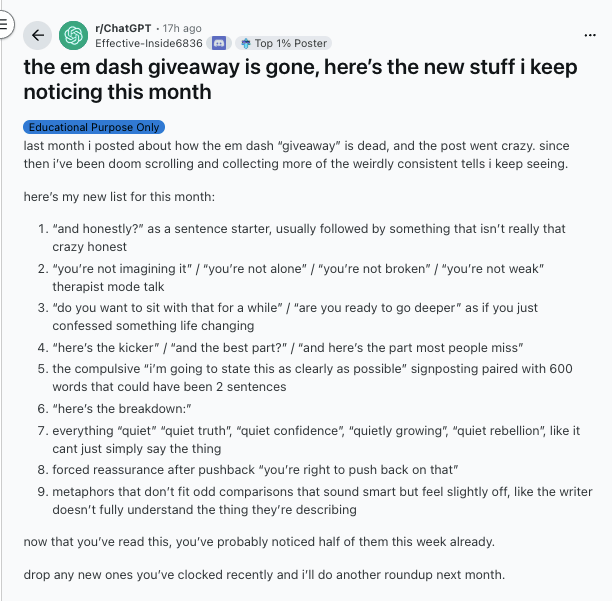
Here’s the TL;DR of the phrases to avoid (you might want to copy + paste that whole thread into a chat window and have GPT or your fave bot put all the phrases in a short list you can add to a “ban” list):
From the OP:
- "And honestly?" — Unnecessary sentence starter before saying something not particularly honest
- Therapist speak — "You're not imagining it/alone/broken/weak"
- Forced depth — "Do you want to sit with that?" / "Are you ready to go deeper?"
- Hype phrases — "Here's the kicker" / "And the best part?" / "Here's the part most people miss"
- Verbose signposting — "I'm going to state this clearly" + 600 words that could be 2 sentences
- "Here's the breakdown:"
- Everything "quiet" — "quiet truth," "quiet confidence," "quietly growing," "quiet rebellion"
- Forced validation — "You're right to push back on that"
Top-Voted from Comments:
- "That's rare” — The new tell everyone's noticing
- "And that matters" — Appears in nearly every response
- "It's not X, it's Y" — The classic contrast framing
- "Let's unpack this" — Overused transition phrase
- Small caption formatting — Breaking text into tiny labeled sections
- "You're allowed to...” — Unsolicited permission-giving
- Excessive emoji bullets — ✅ Organizing ✨ Everything ⭐ With 🎯 Emojis
- "Let's sanity-check this"
- Awkward metaphors — Comparisons that sound smart but don't quite work
The consensus: these phrases now instantly flag AI-generated content to anyone paying attention. You should probably drop ‘em.
Jan 15
It’s high time we all learn how to use Skills, even (and especially) as non-engineers. Luckily, we have Peter Yang to break it down for us, in both video and blog format.
Peter says the no BS take is that Skills are still early, and don’t work 100% reliably yet. Which is why he shares his hack for how to make AI write better.
- First, he explains what a skill is.
- Then he explains when to use a skill vs a project.
- We love the way he breaks this down:
- Use a project for background knowledge.
- Use skills for procedural knowledge to apply to a given context across all relevant conversations.
- TBH, we’ve been using many things that should really be a skill as a project.
- Example: We have different “projects” for different task types.
- Whenever we need to do a given task, we go to that project.
- But wouldn’t it be easier if we simply had it as a skill, so every time we ask the model to do the task, it would know how to do it? Peter thinks so!
- He then shares his writing-style prompt (we like it!).
- After that, he shows how to have Claude create the Skill for you (and where to manage them in the app:
- GO to Claude.ai > Settings > Capabilities > Skills.
- There, you can add the skills or ask Claude to create them for you.
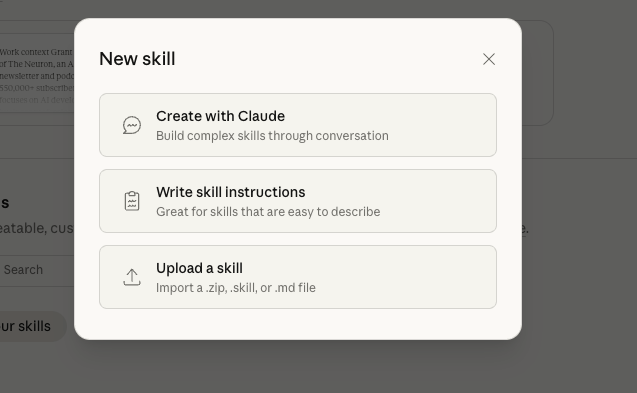
Low key, I have no idea when they added this UI element… that’s how fast AI is moving!
Finally, he explains his hack: use Cursor to help you draft the skills, and include this key line to instruct the AI to check for “applicable skills” before responding. “In practice, if you don’t include this line, Claude isn’t very reliable to use your skill at all.”
P.S: we like his point about why you should only write 1 page strategy docs; any longer, and ppl will use AI to summarize it!. Peter rules, def subscribe to his channel!
Now that that’s out of the way… time to learn sub-agents!
Jan 14
This is your friendly neighborhood reminder to read Dan Shipper's Agent Native Framework blog, as well as watch Every’s recent Agent-Native Apps: How to Build Apps After the End of Code chit chat and check out Dan and co building Agent-Native software in real time; lots of great tips for building agent tools in those three resources.
Now here's a short, TL;DR version of Dan's Agent Native Architectures blog (you can literally go to the page, copy the entire optimized blog for an agent, and pass it to your current Claude Code instance (or maybe save it as a skill to reference later?)
Agent-Native Architecture: The Essentials
Philosophy: Stop building features. Build environments where agents compose atomic tools to solve problems.
The 4 Core Principles
- Parity: If a user can do it in the UI, the agent must have a tool for it.
- Granularity: Build atomic primitives (read_file, write_file), not logic-heavy workflows (analyze_and_save). Logic belongs in the prompt, not the code.
- Composability: New features are just new prompts combining existing tools.
- Emergence: Atomic tools allow agents to solve problems you never designed for.
Implementation Mechanics
- Files as Interface: Treat the file system as the shared brain. Use a dynamic context.md (containing user context, file lists, recent activity) injected into the system prompt at every session start.
- CRUD Completeness: Agents need Create, Read, Update, and Delete access for every entity.
- Explicit Control: Never rely on heuristics. Force the agent to use an explicit completion tool.
- Checkpoints: Save the agent’s state (tasks, memory) to disk to handle app backgrounding and resumption.
Future-Proofing: 3 Additional Insights
To scale this for growing capabilities:
- Sandboxed Compute: For general-purpose agents, move execution from the local OS to isolated environments (Docker/WASM/E2B). This allows "dangerous" tools without risk.
- The Observer Pattern: Implement a "Critic" loop. The agent generates an output (e.g., SQL), runs a verify tool to test it, and self-corrects before the user sees the result.
- Semantic Routing: As tool counts grow, stop loading them all at once. Group tools into buckets; let the agent select a bucket, then swap the system prompt to load only those specific tools.
The Core Philosophy: Stop building features. Start building environments.
Instead of coding rigid workflows (e.g., a "Summarize PDF" button), you build a suite of atomic tools and let the agent compose them to solve problems dynamically.
1. The Golden Rule: Parity
- Concept: If a user can do it in the UI, the agent must be able to do it via a tool.
- Why: This guarantees you don't limit the agent's potential. If the agent has full parity, it can perform tasks you never explicitly programmed (Emergent Capability).
2. Tooling Strategy: Atomic Primitives
- Don't build: analyze_and_email_report() (Too rigid, bundles judgment with action).
- Do build: read_file(), write_file(), send_email().
- Result: The agent decides how to combine these based on the user's prompt. New features are created by writing new prompts, not new code.
3. The "Universal Interface" is Files
- Treat the file system as the shared brain between the User and the Agent.
- Why: Files are portable, inspectable, and syncable (iCloud/Dropbox).
- Structure: Use a context.md file that the agent reads at the start of every session. It contains: "Who I am," "What exists in this folder," and "Recent activity."
4. Explicit Control Flow
- Never let an agent "guess" when it's done. Provide an explicit completion tool.
- Use "Checkpoints" to save the agent's state (messages, task lists) so it can resume complex tasks even after the app is closed.
Additional Insights: Building for Growing Capabilities
The guide focuses heavily on implementation mechanics. To truly future-proof this architecture for growing capabilities (as models get smarter), consider these three additional layers:
1. The "Sandboxed Compute" Requirement
Shipper suggests using local files and bash tools. As agents get more capable, they become more dangerous if running directly on your local machine with unchecked access.
- Insight: For "general purpose" agents, you will eventually need Sandboxed Environments (like Docker containers, WASM sandboxes, or E2B).
- Why: This allows you to give the agent dangerous tools (install packages, run python code, delete directories) without risking the user's actual OS. The "File System" becomes a virtual volume, not the user's hard drive.
2. The "Observer" Pattern (Evaluation loops)
Atomic tools allow agents to loop until they succeed. But how do they know they succeeded?
- Insight: You need a secondary "Critic" or "Observer" loop—a lightweight model call that looks at the Agent's output before it is shown to the user.
- Tool: Add a verify_outcome tool. If the agent writes a SQL query, the verify tool runs it and returns the error message or a sample of the data. The agent self-corrects before the user even sees the mistake.
3. Semantic Routing vs. Hard-Coded Tools
The guide suggests "Dynamic Capability Discovery" (listing APIs). As your toolset grows from 10 to 100 tools, the context window will clog up.
- Insight: Move from a single "God Agent" to a Router Architecture.
- How: The main agent sees only "buckets" of tools (e.g., Research Tools, Coding Tools, Admin Tools). When it selects a bucket, the system swaps the system prompt and injects the specific tool definitions for that context. This allows you to scale to thousands of tools without confusing the model.
The Next Step for You
If you are building this now, start with the context.md pattern. It is the highest-ROI implementation detail in the guide.
- Action: Create a dynamic file in your app that auto-updates with the current state of the world (e.g., "User is currently looking at screen X," "Last 3 files edited were Y"). Inject this into your system prompt. It makes the agent feel instantly "aware."
Read the whole blog for more; great job Dan and co!
Jan 13
Here’s how to treat AI like an on-demand think-tank: use high-level framing, divergent idea generation, structured critique, and tight synthesis.
So, we got a user-request for some ideas like this, so we looked up current, practical prompt advice and pulled best practices + research-backed techniques so you can start using prompts as strategy tools (not task-checkers).
Below is a compact playbook + ready-to-use templates you can copy/paste and tweak.
This research-backed framework turns ChatGPT or Claude into a strategic consultant that can diverge, critique, and synthesize ideas like a PhD-level strategist.
The core workflow:
- Set the stage – Assign a role ("You are a senior fellow at a top think tank") with explicit objectives
- Diverge – Generate 10+ strategic options with confidence labels, risks, and metrics
- Critique – Score each option using a rubric (Impact, Feasibility, Cost, Time-to-impact)
- Converge – Build a 12-month roadmap from the top-rated approach
- Red-team – Play devil's advocate and list failure modes + mitigations
Key techniques that actually work:
- Put instructions first, then context (delimit with """ or ###)
- Use Chain-of-Thought ("show your step-by-step reasoning") for deeper insights
- Try Tree-of-Thoughts for complex problems (explore multiple reasoning branches, prune weak ones)
- Force the model to ask 3 clarifying questions before answering—mimics a real consultant's scoping call
Advanced moves:
- Multi-agent panels: simulate experts debating (economist vs. tech policy vs. operations), then synthesize consensus
- Prompt chaining: break work into micro-prompts (scoping → ideation → critique → roadmap) and pass outputs forward
- Evidence mode: require the model to flag whether claims are "from data, inference, or hallucination"
Our favorite insight: The 5-template system (system setup → diverge → score → converge → red-team) transforms vague "help me strategize" requests into structured deliverables with confidence levels, tradeoffs, and contingency plans. It's the difference between asking for advice and commissioning actual strategic research.
Now, let's dive into the full process and prompt in depth:
Quick synthesis — what actually works
- Start by assigning a role and explicit objective (treat the model as a senior fellow at a think tank). Clear role + outcome raises signal-to-noise. (Business Insider)
- Put instructions first, then any context; delimit context with """ or ###. That improves consistency. (OpenAI Help Center)
- Use few-shot examples (3–5) for style/structure when you need consistent outputs. (OpenAI Platform)
- For real reasoning: use Chain-of-Thought (ask the model to show steps) and, for harder problems, Tree-of-Thoughts (explore multiple reasoning branches and compare). These produce deeper, more robust insight than single-shot answers. (Prompting Guide)
- Iterate: generate many ideas, score/evaluate them with a rubric, then synthesize best options with trade-offs and recommended next steps. (This is a repeatable think-tank workflow.) (OpenAI Platform)
Plug-and-play “Think-Tank Consultant” templates
Replace {TOPIC}, {CONTEXT}, {AUDIENCE}, and {CONSTRAINTS}.
1) System / setup (use as the system message)
You can paste this into the system role or as first line of prompt:
You are a senior fellow at a top global think tank (PhD-level strategist). Your job: analyze, invent, and defend high-quality, evidence-aware strategic options. Always: (A) be MECE, (B) show assumptions and uncertainties, (C) give tradeoffs and timelines, (D) label confidence (High/Medium/Low) for each recommendation, and (E) ask for clarifying questions if needed.
2) Diverge — generate options
Acting as that senior fellow, generate 10 distinct strategic approaches for {TOPIC} given this context:
Context: {CONTEXT}
Audience: {AUDIENCE}
Constraints: {CONSTRAINTS}
For each approach: 1-sentence summary, 3 key actions, main risk, one quick metric to track progress, and a confidence label (High/Medium/Low).
3) Critique + score (evaluation rubric)
Now act as an independent reviewer. Use these scoring axes (Impact 1–10, Feasibility 1–10, Cost 1–10, Time-to-impact 1–10). Score each of the 10 approaches above, show a 1-line justification per score, and list the top 3 by weighted score (weights: Impact 40%, Feasibility 30%, Cost 20%, Time-to-impact 10%).
4) Converge — recommended plan
From the scored list, produce a recommended 12-month roadmap for the top approach, broken into: Month 0–3 (pilot), 4–8 (scale), 9–12 (validate/adjust). For each phase: objective, 3 milestones, required resources, leading indicators, and contingency triggers (what to stop/scale based on metrics).
5) Red-team + blind spots
Play devil's advocate: list five arguments that would most likely cause this plan to fail. For each, propose a mitigation or contingency. End by listing three additional research questions we should commission to reduce uncertainty.
Advanced strategies & tricks (how to push the model beyond checklists)
- Multi-agent panels: ask the model to simulate multiple experts (e.g., “Fellow A — econ, Fellow B — tech policy, Fellow C — operations”), have them debate, then synthesize consensus. This surfaces tradeoffs and counters groupthink. (OpenAI Platform)
- Tree-of-Thoughts for hard problems: instruct the model to propose multiple reasoning branches, expand each for 2 steps, prune weak branches, then continue. Use this when you need creative, robust solutions. (Prompting Guide)
- Chain-of-Thought (CoT) on demand: for numeric or causal reasoning, ask it to “show your chain of thought” (or “show your step-by-step reasoning”), then request a concise answer afterward to keep deliverables clean. (Prompting Guide)
- Active clarifying prompts: require the model to list 3 clarifying questions before answering; this mimics a human consultant’s scoping call and prevents wasted work. (OpenAI Help Center)
- Prompt chaining / workflow: break work into micro-prompts (scoping → ideation → critique → roadmap → communication) and pass outputs forward. This mirrors how think-tanks iterate. (OpenAI Platform)
- Force evidence mode: ask for sources or “state whether each factual claim is from public data, inference, or model hallucination” — force the model to flag uncertainty. (When accuracy matters, follow up by asking it to provide citations or say “I don’t know.”) (Business Insider)
Quick example (fill-in)
Prompt (user):
You are a senior fellow at a top think tank. Context: local newspapers in mid-sized US cities face declining ad revenue and staff cuts. {TOPIC}: 3 sustainable business models these papers could try by 2028. Audience: city editors and small ownership groups. Constraints: <$200k initial capex, 18-month runway.
Expected flow: Divergent list → scored evaluation → recommended pilot (3 months) → red-team. Use templates above to run that whole session.
Short checklist before you hit send
- Role + objective? (Yes)
- Instructions first, then context in """? (Yes)
- Deliverable format defined (table, bullets, roadmap)? (Yes)
- Ask for clarifying Qs or force them to ask? (Yes)
- Require confidence/assumptions and evaluation rubric? (Yes)
Stop using AI like a glorified to-do list. Consultant Soren Kaplan says most teams waste AI's real potential by using it to "write emails, summarize research, or generate marketing copy." The bigger opportunity? Turning it into your brutally honest strategic advisor—the one who'll actually challenge your assumptions instead of just affirming what you already believe.
The problem with traditional consultants, Kaplan notes, is that many "play it safe" to secure their next engagement. AI doesn't have that incentive. It can be "the most honest consultant of them all"—if you prompt it correctly.
The Strategic Shift
Strategy consultant Yazhini Samyuktha puts it perfectly: "A weak prompt delivers useless results. Strong prompting is a skill." The difference between using AI as a task-checker versus a think tank consultant comes down to one fundamental shift—stop asking "what should I do?" and start asking "what am I not seeing?"
According to Google Cloud's leadership guide, skillful use of strategic prompting can "compress months of strategic analysis into hours." But it requires treating AI "not as a writer, but as a strategic intelligence system," as SmartB Academy explains.
Prompts That Actually Work
Here are the most powerful strategic thinking prompts we found across expert sources:
1. Steelman Your Opposition
From AI Prompt Hackers: "I believe [your position/decision/idea]. Your job is to argue against this position by building the single strongest counterargument possible—a 'steelman' version that takes the opposing view at its very best. Don't just poke holes in my thinking. Build a complete, compelling case for why I'm wrong."
Why it works: Most AI will tweak your plan. This forces it to question whether the whole plan makes sense.
2. Expose Your Blind Spots
From AI Prompt Hackers: "I'm working on [describe your project/idea/strategy]. I need you to analyze this for blind spots—things I'm not seeing because I'm too close to it. Here's what I believe about [topic]. What assumptions am I making that might be completely wrong? Challenge the foundations of my thinking, not just the surface details."
3. Pre-Mortem Your Strategy
From ReviewRaccoon's critical thinking guide: "Imagine we're looking back at [your decision/strategy] five years from now. Under what circumstances would we consider it a failure? What early warning signs should we watch for?"
And the shorter version from AI Prompt Hackers: "Imagine my idea failed spectacularly. Tell me the 3-5 most likely reasons why, and be specific about what went wrong."
Why it works: Working backwards from failure bypasses your natural defensiveness. As one consultant noted, "It's not saying 'this will fail,' it's saying 'if it failed, here's how.' Much easier to hear."
4. Identify Cognitive Biases
From ReviewRaccoon: "What cognitive biases might be influencing my thinking about [situation]? For each bias you identify, suggest specific strategies to counteract its effects."
5. Scenario Planning
From Sarah Morino's strategic thinking prompts: "Create three scenarios for how [situation] might unfold: a best-case scenario, a worst-case scenario, and a most likely scenario. For each, outline the key factors that would lead to that outcome and how I should prepare."
6. Challenge Your Assumptions
From ClearPoint Strategy: "What assumptions is [your strategy] built on? Identify underlying assumptions and suggest key indicators to track, so we'll know early if something starts to shift."
7. Competitive Blind Spots
From Google Cloud: "Analyze emerging competitive threats in [your industry] that traditional competitors might miss. Focus on non-obvious market entrants, business model innovations, and technology disruptions that could reshape our competitive landscape within 18 months. Identify early warning signals."
The Framework That Ties It Together
Sarah Morino emphasizes that strategic prompts need four key elements:
- Role assignment ("Act as a strategy consultant...")
- Clear goal (What outcome you want)
- Business context (Specific background details)
- Output format (How to present the answer)
Meanwhile, Mind Map Journal warns against "mindless AI use" and recommends the "sandwich method": Start by producing something on your own, use AI to critique and challenge it, then selectively incorporate feedback into your original work.
How to Actually Use This
Kaplan suggests dividing these prompts among your team as pre-work before planning sessions. "Use the AI findings to stimulate team dialogue and supplement—not replace—human judgment and priorities."
As Google Cloud notes: "These prompts accelerate strategic thinking but don't replace executive judgment. Always validate AI insights with domain expertise, market data, and stakeholder input."
Our favorite insight: AI isn't here to replace your team's thinking. As Kaplan says, "It's here to make you better. It helps you see what you're missing. It helps you pressure-test what you think you already know. It helps you build resilience into your strategy by showing you the edges of your assumptions." The shift from task-checker to think tank happens when you give AI permission to disagree with you—and actually listen when it does.
Jan 12 - Becoming a 10x Employee
How to become an indispensable AI-powered knowledge worker
The DeepMind Learning Protocol:"I would benefit most from an explanation style in which you frequently pause to confirm, via asking me test questions, that I've understood your explanations so far. When you pause and ask me a test question, do not continue the explanation until I have answered to your satisfaction."
Key Tools & Workflows:
- Use OpenRouter to test tasks across multiple AIs simultaneously
- Use personal agent tools like Claude Code or Tasklet
- Use Nano Banana (Gemini + "Create Image" tool) for custom image creation
- Use ChatGPT for search with highest "Thinking" mode
- Save working prompts/workflows as custom instructions, Gems, or Skills
Jan 11 - The Ralph Wiggum Agent Workflow
Overnight autonomous coding with structured PRDs
Turn all your PRDs (product request docs) into JSON format with strict evaluation criteria, then run the Ralph.sh command. The agent works through each request, tests it along the way, and updates the PRD once done—looping through your open requests overnight while you sleep.
Resources:
Jan 9 - Context Engineering for Humans and AI
How to ask for help the right way
The Framework: Always state your wish (what you want) AND your obstacle (what's stopping you).
For AI:
- ❌ "Help me analyze this data"
- ✅ "Help me analyze customer feedback—I'm terrible at stats and need patterns for tomorrow's presentation, but can't spot correlations between demographics and satisfaction"
For Humans:
- ❌ "Anyone know how to update the dashboard?"
- ✅ "I need to update our customer dashboard by EOD—I've never touched the API and the docs aren't clear on authentication. @ProjectOwner, can you point me to the right setup guide or hop on a quick call?"
Full article on context engineering
Jan 8 - Claude Code as Life Operating System
47-min video masterclass with Teresa Torres
What Teresa does with Claude Code:
- Types "today" and Claude generates complete to-do list (checking Trello, scanning deadlines, pulling research)
- Writes 9,000-word blog posts with Claude as thought partner
- Does SEO research ("what keywords should I target?")
- Has Claude interview her about her business, then auto-generate context files
Key tip: After every session, ask Claude "What did you learn about me that we should add to a context file?" Let Claude maintain its own memory.
Jan 7 - How to Colorize & Restore Old Photos
Without turning Grandpa into a Pixar character
The Constraint-First Prompt:
Colorize this photo realistically and gently enhance clarity.Preserve faces, expressions, proportions, and composition exactly as they are.Do not reconstruct or alter facial features.Reduce haze, improve contrast slightly, and clean minor noise or specks while keeping natural film grain.Do not add or invent background details.
Iteration prompts:
- "Reduce saturation by ~10% and soften sharpening."
- "Restore texture and grain, especially on faces."
- "Avoid smooth or plasticky skin."
Agentic Prompting - Why Your AI Agents Suck:
Stop dumping context into agents. Instead:
- Be specific: Not "manage my inbox" but "Archive newsletters; flag urgent emails from my boss; delete promotions; ask before responding"
- Define permissions: Use verbs, not personalities. Example: "Suggest actions, but don't execute without confirmation"
- Quality over quantity: Clear bullet points beat contradictory instructions
- Try this: Write out all instructions, then cut them in half. You'll be surprised how much clearer the results become.
Watch Corey's video on agentic prompting
Jan 6 - Personal "Terms of Service" for 2026
Stop negotiating your boundaries in real time
Think of this like a friendly contract with future-you: clear defaults, fewer awkward moments, and less calendar chaos.
Drop-in prompt:
"Ask me questions about my goals and help draft my Personal Terms of Service for 2026. Note my role(s), priorities, dealbreakers, ideal week, and 3 pet peeves. Keep it 1 page, lightly funny, and include 3 copy/paste boundary scripts. Write it like product rules: short sections, bold headers, specific behaviors."
What this creates: A one-page document with your roles, priorities, dealbreakers, ideal week, pet peeves, and 3 ready-to-use boundary scripts you can copy/paste when needed.
Bonus Tool Tip - SAM 3D: Turn any photo into a 3D model in 30 seconds using Meta's SAM Playground. Upload image → Click object → Hit "Generate 3D" → Download as PLY or GLB. Watch the tutorial.
Jan 5 - Boris Cherny's Claude Code Production Tips
13-tip masterclass from Claude Code creator
Boris Cherny (creator of Claude Code) shared his production workflow:
Key tips:
- Run Claudes in parallel: 5 in terminal + 5-10 on claude.ai/code, teleporting sessions between them
- Use Opus 4.5 with thinking for everything: Bigger and slower, but you steer less, making it faster overall
- Start in Plan mode: Go back and forth until solid, then switch to auto-accept edits
- Automate with slash commands: Use commands like /commit-push-pr dozens of times daily (commands live in git)
- Share a CLAUDE.md across the team: When Claude does something wrong, add it so it doesn't happen again. @.claude on PRs via Github action
- Give Claude a way to verify its work: Use the Chrome extension to test every change, opening browsers and iterating. Verification 2-3x's quality.
Jan 4 - The "Grumpy Senior Dev" Code Review Hack
Force Claude to roast its own code
The Prompt:"You wrote the code that currently is in git changes. Do a git diff and now pretend you're a senior dev doing a code review and you HATE this implementation. What would you criticize? What are the edge cases I'm not seeing?"
How to use it:
- Ensure the AI sees the git diff (or paste before/after code)
- Filter the noise: Distinguish "critical flaws" (fix these) from "over-engineering" (ignore these)
- Rule of thumb: Run it at least twice
TL;DR: Don't merge the first draft. Make the AI hate it first.
I still need to fetch the remaining articles from your list. Let me continue to get the complete collection.
Jan 1 - "12 Tiny Experiments" for 2026
Make resolutions you can actually test
Most New Year's goals are giant lifestyle overhauls… which is why they die around mid-January. This flips it: you're running 12 tiny experiments—low-cost, low-time, high-curiosity.
The "12 tiny experiments" Prompt:
Propose 12 small experiments I can try this year (one per month) focused on fun, learning, creativity, or relationships.Each experiment must cost under $50 and take under 2 hours to start.Include a clear starting step and what success looks like.Then ask me which to keep, tweak or drop before we finalize the list.
Check out our previous Prompt Tip Digests Here
Here are all of our previous prompt tip digests from 2025 for you to catch up fast on the best advice we've found to help you prompt and work with AI.
- April 2025: The early playbook for getting consistent, structured outputs from modern models. Features Gemini's literalism quirks, historical deep-dives, ChatGPT as a ruthless editor, and the AI Meta-Coach prompt for identifying blind spots.
- May 2025: Our original meta-prompts, resume upgrades, and "assumption hunter" frameworks. Includes the writing roast master technique, the Five Whys method, and emotional recipe pairing.
- June 2025: Productivity-first prompts for research, writing, and planning. Features Cornell numbering systems for AI memory, Socratic tutoring prompts, and extended Claude search capabilities (10-20 sequential searches).
- July 2025: Real-world prompt patterns for builders, creators, and operators. Covers context engineering fundamentals, ChatGPT's Agent mode template, and structured multi-step task formatting.
- August 2025: GPT-5 era prompting, vibe-coding workflows, and advanced evals. Features Anthropic's production-ready prompt framework, vibe-coding security guides, and the meta-prompt optimizer technique.
- December 2025: Meta-prompters that rewrite your prompts for better results, battle-tested frameworks for coding, research, and content. Covers prompt shortcuts/tokens, context-first ordering, and prompt framework reverse-engineering.
And if you ever have any specific questions on prompting best practices or where to find additional resources, email us at team@theneurondaily.com to ask us and we'll try to respond directly OR, if broad enough, include that answer in a future Prompt Tip of the Day!
