



Remember spending hours building the perfect spreadsheet formula, only to realize you needed a PhD in Excel-fu to make it work? Those days might be over.
Microsoft just dropped Agent Mode and Office Agent into Microsoft 365 Copilot, and it's basically like hiring a really smart intern who never sleeps and actually knows how to use pivot tables.
Agent Mode works directly inside Excel and Word (PowerPoint's coming soon). Instead of just answering questions, it handles entire multi-step projects. Think of it as the difference between asking ChatGPT for advice versus having it actually do the work for you.
The Excel version is wild. You give it a prompt like "Run a full analysis on this sales data," and it decides which formulas to use, creates new sheets, builds visualizations, and even validates its own work. It's using OpenAI's latest reasoning models, which means it can think through problems step-by-step and fix its own mistakes.
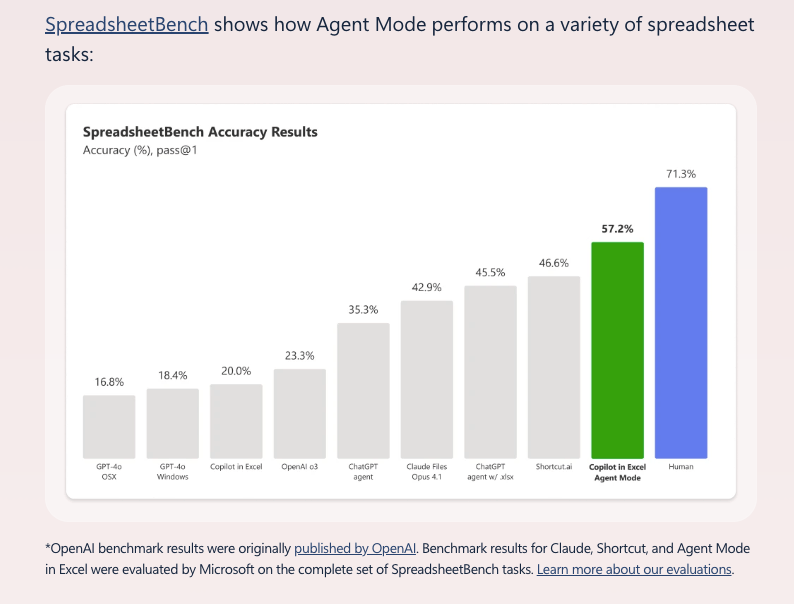
As far as how well this works? According to SpreadsheetBench, better than other AIs, but still not as good as a human (yet).
Here's what you can actually do with Agent Mode:
- Build a loan calculator with payment schedules and interest breakdowns.
- Create monthly budget trackers with conditional formatting.
- Generate financial reports with year-over-year comparisons.
- Draft documents that pull data from your emails and other files.
Office Agent lives in Copilot chat and creates full PowerPoint decks and Word docs from scratch. It'll research topics on the web, structure your content, and even ask clarifying questions. One prompt example: "Create a deck summarizing the top 5 trends in athleisure clothing." It handles the research, builds the slides, and lets you iterate in chat.
Why this matters: Microsoft's betting that the future of work isn't just chatting with AI: it's delegating actual tasks (not copy-pasting into your chat app and the tools you actually use for your work). They're calling it "vibe working" (yes, really lol), and it's their answer to vibe coding in software development.
This is Microsoft's shot at making Office feel cutting-edge again after decades of incremental updates. Whether they feel the walls closing in by competitors like Paradigm, Shortcut, and ChatGPT Agent, or if this is just the next most logical evolution of Copilot getting better, if it works, your next Excel nightmare might involve too much AI help rather than not enough.
Available now in the Frontier program for Copilot users. Try Agent Mode in Excel here, Agent Mode in Word here, and Office Agent here.
P.S: Microsoft recently announced that you can now use Claude's models in copilot, and Anthropic just released a new model called Sonnet 4.5, which Microsoft says is also now available in Copilot Studio (replacing Sonnet 4), so builders can pick it for orchestration today, with Prompt Builder support coming in October—flip on Anthropic in Admin Center and you’re off to the races. The regular Microsoft 365 Copilot still hides the model picker, but under the hood you may see 4.5 show up as routing evolves.
